
3D filming simulator — where to put your phone
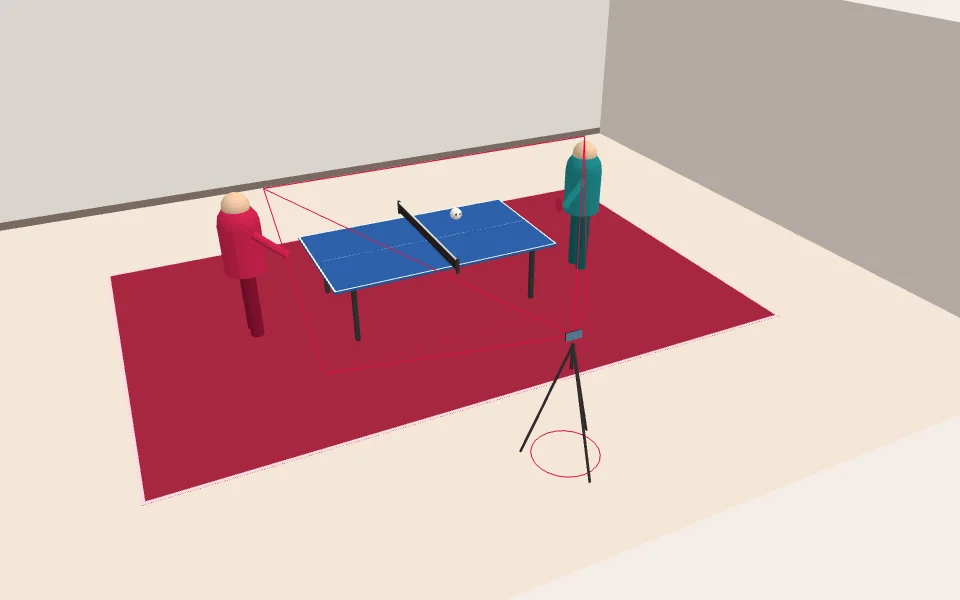
Drag the tripod, change the height and tilt. The phone view shows what that camera sees, and the score shows how good the spot is for automatic scoring (TT Score). The rules come from TT Lab measurements and what the engine actually requires; anything not measured is marked "advice (not measured)".
Recommended spots
Press one to move the phone there and update the score.
- LiveUpload
The same side view as the videos the engine was tested on: 96% in synthetic tests, bounce side right 1.00 on real video.
If players step far back, they may touch the frame edge — move half a step back.
- Upload
Players block less and the table top looks wider.
A held ball is read as a bounce more often (synthetic tests 75–90%). Expect to fix more "needs review" rallies.
- Upload
Works when a wall or pillar keeps you off the middle of the side.
Bounce side is less reliable (0.99 → 0.80 with automatic corners). Tap the corners yourself and keep ceiling lights out of the top of the frame — most false balls were fluorescent lights. Advice.
- No auto scoring yet · coming soon
Great for watching strokes and placement.
From here the current engine tells which player's side a bounce is on only 55–60% of the time (side view 100%). Ball tracking and video only; auto scoring is coming soon.
- Camera scoreboard
The score shows on the phone so players can see it while they play. You add points by hand (tap or selfie remote).
Condition: the screen faces both players and the farthest one is within about 4m so the digits are readable — advice (not measured). Turn brightness up.
Use it live, or upload a recording
Live — stand it up and go
- Camera scoreboardComing soon — Stand the phone in selfie mode and a broadcast-style scoreboard sits on the camera view. You enter points by hand; recordings stay on the phone.
- Live ball finder — The server finds the ball in your camera and draws a box around it (sign-in).
- Wi-Fi — the live ball finder sends 30 small pictures a second (512×288, about 15KB each), about 0.4MB per second.
- Power — camera and screen stay on, so the battery drains fast. Plug in a charger or power bank (drain not measured).
- Screen kept on — turn off auto-lock or make it long. When the screen sleeps, the camera stops.
- The live ball finder has 3 seats. Alone you get about 29 answers a second within 0.03s; with three users each gets 16–20 (measured).
- Automatic scoring is not open for live use yet. Live today means the hand scoreboard and the ball finder.
Upload — record, then sendComing soon
- Put the tripod on the recommended spot and start recording at 60fps.
- After warm-up, press "Start match" right before the first serve (why below).
- Upload the video when the match ends.
- You get automatic scores, an edited video of the rallies, and highlights.
- Rallies the engine is unsure about are marked "needs review"; a person fixes only those.
The upload page is on its way. When it opens, an "Upload a recording" button appears here. Keep your videos on the phone until then.
On public test matches the engine got about 9 in 10 rally winners right (88.7–93.1% depending on the engine version), and the edited video was 32–63% shorter than the original. Not yet measured on phone video (generalisation unknown).
The engine then ignores warm-up serves and ball hand-backs. In tests on five real matches, the score after each rally was right 36/49 times instead of 27/49. Press it right before the first serve — pressing more than 5 seconds early did not help.
At a glance
| Live | Upload | |
|---|---|---|
| When you get scores | During play (by hand) | After the match, automatically; people fix only flagged rallies |
| What you get | Camera view with scoreboard, phone recording | Automatic scores, edited video, highlights |
| Internet | Scoreboard works offline · ball finder needs Wi-Fi | Only to upload |
| Phone spot | Selfie scoreboard or recommended spot | Recommended spot (side, 1.2–1.5m) |
| Now | Ball finder open · camera scoreboard coming soon | Coming soon |
Which one?
- You want to see the score while playing → Live · camera scoreboard
- You want to see where the ball went, right away → Live · ball finder (sign-in)
- You want a scored video and highlights after the match → Upload
Recording settings
- Keep 60fps measured — Fast balls were found 0.29–0.54 of the time in 30fps video and 0.86–0.91 in 50–60fps video.
- 1080p (at least 720p) measured — In 1080p phone-size video the ball was 6–16px wide and found more than 8 in 10 times. Whether 4K helps is not measured.
- Landscape, on a tripod engine requirement — The engine keeps the four table corners it fixed at the start. If the frame moves, they drift.
- Keep the ball basket and ceiling lights out measured — 29% of false detections were resting balls (floor, basket); most false balls in angled video were fluorescent lights.
- Turn off stabilisation advice (not measured) — Not needed on a tripod, and it can shift the frame so the table seems to move.
- Lock exposure and focus advice (not measured) — Long-press the table so the brightness does not change when players walk by.
How the filming score works
| Check | Rule | Basis |
|---|---|---|
| Side view | Within 25° of the net line. Beyond 50° (end view): no auto scoring | measured Side accuracy 55–60% from the end, 100% from the side; 0.80 on real angled video |
| Four corners | All on screen | engine requirement The engine fixes the table from four corners |
| Above the table | Phone above the table surface (76cm) | engine requirement Bounces are found inside the top band |
| Landscape | Landscape | engine requirement Video is shrunk to a wide 512×288 frame to find the ball |
| Ball size | Far-end ball 6px or more (1080p) | measured Ball found 0.74–0.89 at 6–16px in 1080p video |
| Top band | 8% of the height or more | measured Test videos 10–17%; a camera just above the table got 75.8% with noise (side 83.0%) |
| Height | 2m or lower | measured 2.2m camera 75–90% in synthetic tests (side 96%) |
| Level | 8° or less | measured 8° roll 95.4% in synthetic tests |
| Ceiling lights | No ceiling at the top of the frame | measured 15 of 20 false balls in angled video were lights |
| Ball basket | Out of frame | measured Resting balls were 29% of false detections |
| Players blocking | 5% or less of the table and ball path | advice (not measured) Balls overlapping players found 0.863 (all 0.979) |
| Far edge and margin | Far edge 30%+ of the width, 10%+ margin each side | advice (not measured) Test videos: far edge 39–41%, margin 15%+ |
| Net and backlight | Net near the middle, window out of frame | advice (not measured) Filming guide |
Measurements come from public test matches, research match videos and synthetic tests. Scoring accuracy on real phone video from club halls has not been measured yet.