
How Not to Confuse -L, -R and -D
In one line
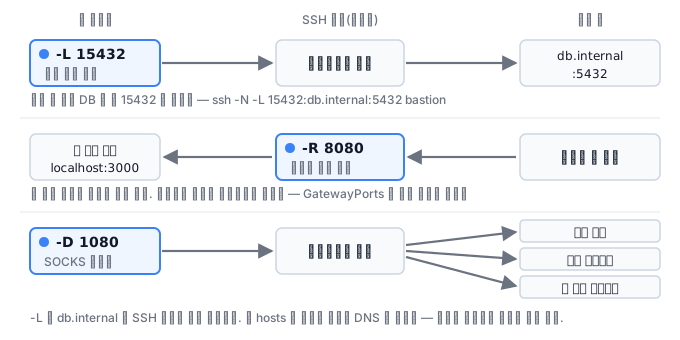
-L opens a port on my side and sends it over there, -R opens a port on the other side and pulls it back to my side, and -D sets up a SOCKS proxy on my side. Once you get the direction right, the rest is syntax.
Why this exists
You need to connect to a database on the internal network, but that database cannot be reached from outside. You can connect to the bastion server with SSH. What you need here is local forwarding. A connection coming in on port 15432 of my laptop is sent through the bastion to db.internal:5432.
ssh -L 15432:db.internal:5432 bastion
How to read it: -L <내가 열 포트>:<배스천이 볼 때의 목적지>:<그 포트> (the port I open, the destination as the bastion sees it, and that port). The key point is that the host name in the middle is resolved from the SSH server's point of view. It does not matter if db.internal does not resolve on my laptop.
How it works
| Option | Where the port opens | Traffic direction | Typical use |
|---|---|---|---|
-L |
Local | Local → SSH server → destination | Reaching an internal database or admin console |
-R |
Remote (the SSH server) | Remote → SSH server → local → destination | Exposing a service behind a firewall to the outside, receiving webhooks |
-D |
Local (SOCKS) | Any destination the application picks | Routing a whole browser through the internal network |
For a tunnel-only connection, use -N -f together. -N does not run a remote command, and -f sends it to the background.
ssh -N -f -L 15432:db.internal:5432 bastion
-R has a trap. By default it binds only to the SSH server's loopback. That is, other people on the server cannot use that port. To open it to the outside, you have to turn on GatewayPorts yes on the server, and this calls for caution for security reasons.
The directives that control forwarding on the server side.
AllowTcpForwarding no
AllowAgentForwarding no
GatewayPorts no
PermitOpen 10.0.5.20:5432
PermitOpen is especially practical. Without blocking forwarding entirely, it restricts the destinations to a whitelist. It fits exactly the situation "a developer must connect to the production DB but must not reach other internal services".
Agent forwarding is dangerous
-A (agent forwarding) is convenient, but someone with root privileges on the intermediate server can authenticate to other servers with my key through my agent socket. If the goal is to go through a bastion, use ProxyJump (-J). You get the same result without exposing the agent.
ssh -J bastion deploy@10.0.3.14
Escape sequences
When you use a tunnel, there are times the connection looks frozen. What you use then is an escape sequence. At the very start of a line, press ~ and then type the next character.
| Sequence | Action |
|---|---|
~. |
Force-close the connection (escape a frozen session) |
~^Z |
Put SSH in the background |
~# |
List of forwarded connections |
~C |
Open a command line (add/remove -L while running) |
~? |
Help |
Surprisingly few people know that with ~C you can add forwarding during a connection. It is useful when you need to dig one more tunnel without dropping the session.
How not to mix up the three directions
-L, -R, and -D differ only in the letter but do entirely different things. If you grasp just which side listens and
which side goes out, you will not mix them up.
| Option | Where it listens | Where it goes out | When you use it |
|---|---|---|---|
-L 5432:db:5432 |
My computer | The remote server | Connecting to a DB I cannot reach |
-R 8080:localhost:3000 |
The remote server | My computer | Letting others outside see my development server |
-D 1080 |
My computer (SOCKS) | The remote server | Many destinations at once |
The db:5432 of -L is a name as the remote server sees it. It is resolved by the server's DNS, not my hosts file. This is where it goes wrong most often.
Why the remote port does not open to the outside
If you set up -R 8080:localhost:3000 and get refused when connecting from another machine, it is not a
configuration problem but the default. Under GatewayPorts no, sshd opens the forwarded port only on
the remote server's loopback. You have to change it to GatewayPorts clientspecified in the server's /etc/ssh/sshd_config and
specify the address, like -R 0.0.0.0:8080:localhost:3000, for it to open outward. Turning this value on means that anyone who can connect to that server can expose a port on my laptop to the internet, so
you do not turn it on on a shared jump server.
It is not ssh that revives a dropped tunnel
A tunnel always drops. The NAT table expires, the wireless drops, the server restarts.
ssh itself does not reconnect, so reopening is the job of something outside.
autossh -M 0 -N \
  -o ServerAliveInterval=15 -o ServerAliveCountMax=3 \
  -o ExitOnForwardFailure=yes \
  -L 5432:db.internal:5432 jump.example.com
ServerAliveInterval is a device for checking whether a quiet connection is dead. It
asks every 15 seconds and drops the connection after three unanswered tries. ExitOnForwardFailure=yes makes it so that if the port could not be opened, the connection does not count as a success. If you leave this out, an ssh that is alive without a tunnel
remains, and you get a state where the connection is up but nothing works.
Saving connections with multiplexing
If you keep connecting to the same server, you share one connection.
Host jump
  ControlMaster auto
  ControlPath ~/.ssh/cm-%r@%h:%p
  ControlPersist 10m
From the second connection on, the handshake and authentication are skipped, so the difference you feel is large.
However, ControlPath is a socket file, so if the home directory is on NFS, it does not
work. In that case, move it under /run/user/$UID.
What it looks like in the field
Opening a tunnel and forgetting it. An ssh process sent to the background with -N -f stays quietly alive. A few weeks later it becomes "who opened this port?". If the process shows as ssh in ss -ltnp, it is a tunnel. Some places have a team rule to leave the purpose in ControlPath or the process name.
What you will do in the next lab
You build all three directions of forwarding, local, remote, and dynamic, and use ss to check where each tunnel opened its port. At the end you submit a comparison table of the three methods together with real evidence.