
User Namespaces and subuid/subgid
In one line
A rootless container is possible because creating a new user namespace makes you UID 0 inside it. From the outside, you are still an ordinary user.
Why this was needed
Creating a container requires privileged operations such as mount, pivot_root, and creating a network namespace. That is why container daemons ran as root for a long time. As a result, /var/run/docker.sock became effectively root privilege itself, and attacks that target it never stopped. A user who can reach that socket can take over the host just by starting a container that mounts the host's root filesystem.
User namespaces changed this problem at its root.
How it works
The mapping principle
If you create a new user namespace with unshare(CLONE_NEWUSER), you can map it so that your UID appears as 0 inside. And inside the new namespace you hold every capability. That is why operations such as mount or creating a network namespace become possible there.
What matters is that this privilege is valid only inside the namespace. For files outside, you still have only the permissions of your original UID. Even if a container breaks out, all it gets is ordinary user privilege.
Why one UID is not enough
A container image contains files owned by many UIDs: root (0), nobody (65534), an application account (1000), and so on. If you map only one UID, you cannot unpack that image correctly.
So the system lends you a range of UIDs. /etc/subuid and /etc/subgid are the ledgers for that.
# /etc/subuid
podster:100000:65536
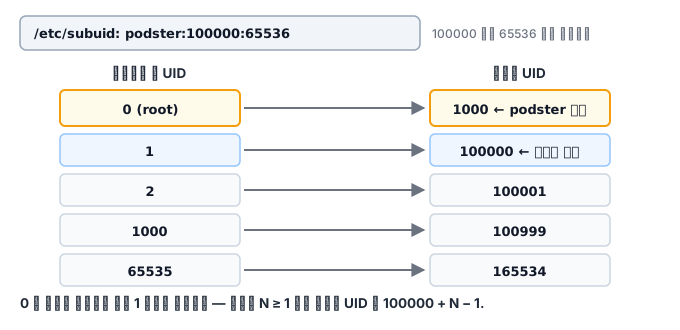
How to read it: the user podster may freely use 65536 UIDs, starting from host UID 100000, inside its own namespace.
The resulting mapping looks like this.
| UID inside the container | Host UID |
|---|---|
| 0 (root) | podster's own UID (for example, 1000) |
| 1 | 100000 |
| 2 | 100001 |
| 1000 | 100999 |
| 65535 | 165534 |
Note that UID 1 inside the container corresponds to host UID 100000. UID 0 maps to the user themselves, and the subuid range starts from 1. So the host UID for container UID N (N≥1) is 100000 + N - 1.
The range is 65536 UIDs because most of the UIDs that container images use fall inside it. Each user must get a range that does not overlap with others, so ranges are usually assigned 65536 apart, such as 100000, 165536, 231072, and so on.
To actually apply a range, you need setuid helpers called newuidmap / newgidmap (the uidmap package). If these binaries are missing or lack file capabilities, the range mapping fails and podman falls back to single-UID mode. Containers still start in that state, but images that use several UIDs hit permission errors.
How to check
grep '^podster:' /etc/subuid /etc/subgid
podman unshare cat /proc/self/uid_map
podman info --format '{{.Host.Security.Rootless}}'
podman info --format '{{.Store.GraphRoot}}'
podman unshare runs a command inside the same user namespace that podman uses. It is an essential tool when debugging file ownership problems. For example, when the owner of a volume directory looks strange, running podman unshare ls -l <경로> shows the owner from the container's point of view (the placeholder is the path).
Limits of rootless
| Limit | Reason | Workaround |
|---|---|---|
| Cannot bind ports below 1024 | Privileged ports | Adjust net.ipv4.ip_unprivileged_port_start, or use a high port plus a reverse proxy |
| The network is a user-space stack | Goes through pasta/slirp4netns | Use rootful if you need extreme performance |
| Some storage drivers are restricted | Overlay mounts need privilege | fuse-overlayfs or vfs |
| Limited cgroup control | cgroup v2 delegation is required | Configure delegation of the systemd user slice |
| ping may not work | ICMP socket permission | Adjust ping_group_range |
What it looks like in the field
"You look for the disk the way you would with docker system df, and get confused." Images of rootless podman pile up not in /var/lib/docker but in ~/.local/share/containers/storage. On a server with a small home partition, this alone fills the disk. That is why the graph root migration scenario in the next module comes up so often in practice.
podman info shows rootless as false. Either you ran it as root, or there was no mapping configuration and it fell back to rootful. If you do not check which one it is, you can spend days wondering "why are the file owners strange?"
What to look for in the next check
The quiz that follows distinguishes the scope of privilege in a user namespace, the subuid/subgid mapping, and the rootless network and storage limits. After you check those criteria, the next module has you write the mapping for the user podster, plus storage.conf and registries.conf.