
Scale and Zero Point: Quantization Is Choosing a Ruler
In one line
Quantization is deciding the grid spacing (scale) and the position of 0 (zero_point) on the real-number axis, and once those two are decided, the rest is only division and rounding.
Why you need to know this
Call a conversion tool and an int8 model comes out. When accuracy drops, what should you fix? Give less calibration data, split by channel, leave only the activations as float? These choices are all choices about how the scale is decided. If you do not know what arithmetic runs inside, you cannot choose and only trial and error remains.
And there is a place where it really goes wrong. The most common is the case where 0 does not come back as 0. If you set the scale using the observed range [0.4, 7.0] as it is, the real number 0.0 is outside the representable grid. The 0 that padding and ReLU produced comes back as a non-zero value, and that error swells as it goes through the layers. That is why an implementation that follows the specification always includes 0 in the range.
How it works
ONNX does this work with two operators. QuantizeLinear brings real numbers down to integers, and DequantizeLinear raises integers to real numbers. The definitions are short.
QuantizeLinear     y = saturate(round(x / y_scale) + y_zero_point)
DequantizeLinear   x = (q - x_zero_point) * x_scale
round is rounding that sticks to the even side. 0.5 goes to 0, 1.5 goes to 2, and 2.5 also goes to 2. saturate is cutting to the two ends of the data type, which is 0 and 255 for uint8 and -128 and 127 for int8.
The scale and zero point come from the observed range [lo, hi]. There are two branches.
- Asymmetric (uint8):
scale = (hi - lo) / 255,zero_point = round(0 - lo / scale). It distributes all 256 grid steps over the range. The zero point becomes a non-zero value, and that position is the integer coordinate of the real number 0.0. - Symmetric (int8):
reach = max(|lo|, |hi|),scale = reach / 127,zero_point = 0. It pins 0 in the middle and gives the same width on both sides. Because the zero point is 0, one subtraction disappears in the integer kernel — this is why weights are handled symmetrically.
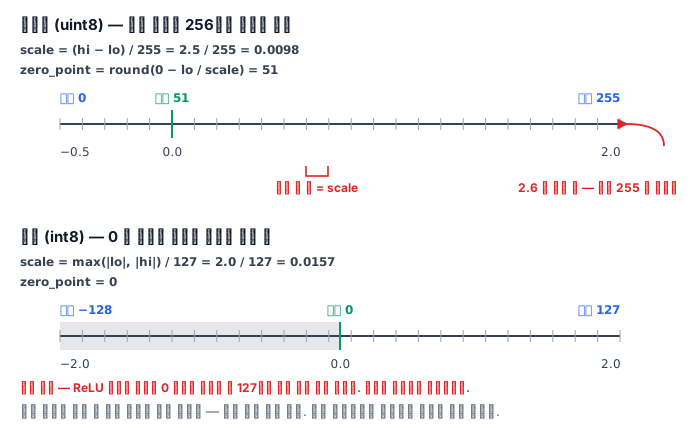
An important property follows here. The round-trip error does not exceed half the scale. Quantization moves a value to the nearest point on a grid of multiples of the scale, and since the grid spacing is the scale, at most it is half. But that holds only when it is within the range. A value that went outside sticks to the wall, so the error can be arbitrarily large. If the error greatly exceeds half the scale, it is a range problem, not a rounding problem.
What it looks like in the field
First, handling activations symmetrically throws away half. The activations after a ReLU are all 0 or above. If you apply symmetric int8 here, the 127 grid steps on the negative side receive no values. The remaining grid is half, so the scale becomes twice as coarse, and the error becomes exactly double. That is why in many cases the default is symmetric for weights and asymmetric for activations.
Second, one outlier ruins the whole tensor. If only one position in a weight matrix has a large value, the scale of the whole tensor grows to fit that value, and all the other positions crowd onto just a few grid steps. Here the answer is per-channel scale. If you give each output channel its own scale, the damage is confined within the channel that holds the outlier. The axis attribute of QuantizeLinear and a 1-dimensional scale tensor express this.
Third, if you compute the scale in float64, it goes off from the runtime. The runtime divides in float32. If the value divided with a Python float lands on a boundary, the rounding goes the other way, and about 1 percent of the elements differ by one grid step. It is not a big problem, but it is a place where you lose time asking "why does my calculation differ from the model output".
Fourth, to measure error you need a criterion. "Accuracy dropped by 1 percent" is a deployment judgment, and "the round-trip error exceeded half the scale" is a cause judgment. The latter can be known by looking at a single layer and points directly at where to fix.
What really matters in practice
- Put 0 in the range. Even if the observed range is skewed to one side, extend it toward 0.
- If the error exceeds half the scale, suspect saturation. The problem is the range, not the rounding.
- Choose the method that fits the shape of the data. Do not apply symmetric to data that comes out only 0 or above.
- If there is an outlier, split the channels. The whole-tensor scale is held hostage by the single largest value.
What you will do in the next lab
You grow qmath.py one step at a time and implement scale and zero point computation, quantization, dequantization, round-trip error and per-channel scale yourself. The grader does not trust the numbers you wrote out — each time it builds arrays with a different seed, actually runs your tool, and checks against the result of putting the same values straight through ONNX's QuantizeLinear and DequantizeLinear operators.