
Small Requests Work and Large Responses Stall
In a nutshell
If curl gets the headers but stalls at the body, nine times out of ten it is an MTU black hole. Being able to connect and letting large packets through are different problems.
Why this was needed
This kind of symptom holds people for a very long time.
curl -I(headers only) → succeeds immediatelycurl(the whole thing) → stalls for a few seconds and then times out- Small API responses are normal, only list queries fail
- It reproduces when the VPN is on and not when it is off
Because "it connects", you do not suspect the firewall, and because "it works sometimes", you judge it is not DNS either. The cause is that large packets are silently dropped somewhere along the path.
MTU and PMTUD
The MTU (Maximum Transmission Unit) is the maximum size of a packet that can be sent at one time. Ethernet is usually 1500 bytes.
The problem is when there is a segment with a smaller MTU in the middle of the path.
클라이언트(1500) → 라우터 → VPN 터널(1400) → 서버(1500)
TCP announces to each other when connecting, "I can receive up to 1460 bytes (MSS)". But this is the circumstances of the two ends, not those of the segments in between.
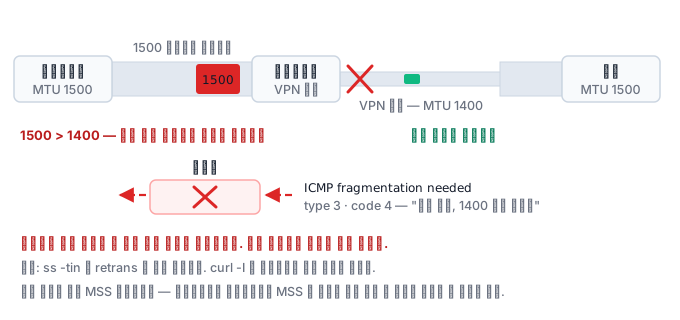
If all is well, it works like this — when a 1500-byte packet reaches the 1400 segment, that router sends ICMP "Fragmentation Needed" to tell it "it's too big, reduce it to 1400". The sender reduces the size and sends again. This process is called Path MTU Discovery.
The black hole arises when ICMP is blocked
Many organizations say "ICMP is dangerous" and block all of it at the firewall. Then this happens.
- A large packet reaches the small-MTU segment
- The router drops it and sends ICMP
- The ICMP is blocked at the firewall
- The sender hears nothing and keeps retransmitting at the same size
- It fails forever. There is not even an error message
This is the PMTUD black hole. Small packets (the handshake, header requests) get through and only large packets (the body) vanish, which is why the symptom is so confusing.
Diagnosis — how to check without privileges
Measuring while changing the size with ping -M do -s is the textbook method, but ping needs the NET_RAW capability and cannot be used in locked-down environments. Fortunately there are other ways.
1. Check the path and the MTU
ip route get 8.8.8.8
# 8.8.8.8 via 10.0.0.1 dev eth0 src 10.0.0.5
ip -o link show          # 각 인터페이스의 mtu 값
cat /sys/class/net/eth0/mtu
2. Reproduce by varying the response size
curl -s -o /dev/null -w '%{size_download} %{time_total}\n' \
  'https://api.example.com/items?limit=1'
curl -s -o /dev/null -w '%{size_download} %{time_total}\n' \
  'https://api.example.com/items?limit=1000'
If only the small response succeeds, it is a strong signal.
3. Look at headers and body separately
curl -I https://target/            # 헤더만 → 성공?
curl --max-time 5 https://target/  # 전체 → 멈춤?
4. Look at the socket state
ss -tin dst 10.0.3.20
# ... mss:1460 ... retrans:0/14 ...
If retrans keeps increasing, it means the same packet is being sent repeatedly. It is the typical fingerprint of an MTU black hole.
Response
| Response | Method | Note |
|---|---|---|
| Allow ICMP | Open at least type 3 code 4 on the firewall | The fundamental fix |
| Lower the interface MTU | ip link set eth0 mtu 1400 |
Requires privileges |
| MSS clamping | Adjust the MSS on the router/firewall to fit the path | A common field solution |
| Shrink application responses | Pagination | Only a workaround |
What is used most often in the field is MSS clamping. If the gateway lowers the MSS value of the TCP handshake to fit the path MTU, large packets are never created in the first place.
Look at routing too
It may also be something other than MTU. If ip route get points to a different interface than you expected, the path itself is the problem.
ip route get 10.0.5.10
# dev eth1 이 나온다면 — eth0 로 갈 줄 알았는데 아니었다
ip rule show           # 정책 라우팅이 있는가
ip route show table all
It is common for the default route to change entirely when you turn on a VPN, and then traffic that should go to the internal network leaks out to the VPN, or the reverse.
What it looks like in the field
- Only VPN users' file downloads stall → tunnel MTU + ICMP blocking.
- After a cloud migration only one particular API times out → reduced MTU of the overlay network.
- It reproduces only in containers → the CNI's MTU setting differs from the host's.
What to check in the quiz that follows
Check whether you can explain why the phenomenon of only small requests succeeding points to an MTU black hole, and whether you can tell the rise in retransmissions in ss -tin apart from other normal indicators.