
Network Fundamentals — Hands-on in a Linux VM
TCP, UDP, ICMP — Three Faces of 'It Doesn't Work'
In one line
TCP opens a connection with three messages, SYN, SYN-ACK, and ACK, closes it with FIN, and answers a closed port with RST. UDP has no connection and reports a closed port with ICMP port unreachable. A packet larger than the MTU is fragmented (without DF) or dropped (with DF), and the notice of that fact is also ICMP.
Why this exists
The single sentence "the connection doesn't work" mixes three causes that are different. If you send a SYN and an RST comes back, the peer is alive and nobody is on that port. If nothing comes back, a firewall dropped it or there is no route. If it got as far as SYN-ACK but no data arrives, the application has stalled. To the user all three are "it doesn't work", but the people who fix them are completely different. If you can read the flags, the three are separated in the first 30 seconds.
How it works
The TCP handshake has three steps because each side must also receive confirmation that the other confirmed its starting sequence number.
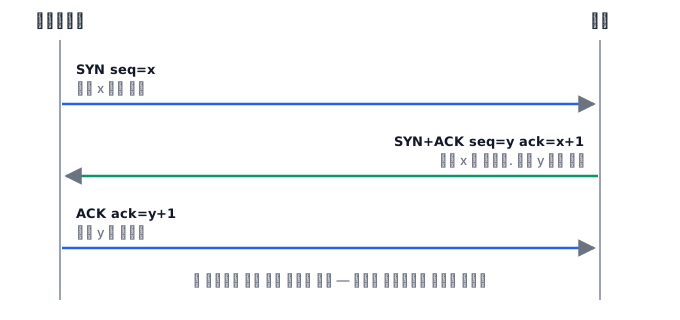 The side that closes first stays in TIME-WAIT for 60 seconds — it has a duty to resend the last ACK if it gets lost, and a duty to seal the 4-tuple so that late old segments do not mix into a new connection. A client that opens thousands of short connections per second runs out of ephemeral ports (
ip_local_port_range, usually 32768–60999) because of this. The kernel picks the client port from this range; only the server port is by agreement.
With UDP, sending is the end of it. You do not know whether the peer is listening or whether it received anything. If you send to a closed port, the kernel returns an ICMP port unreachable, but if a firewall blocks ICMP wholesale, that answer disappears too, leaving only "no response". This is why DNS does its own retries.
The MTU is the maximum size of an IP packet the link carries. On Ethernet's 1500, subtracting the 20-byte IP header and the 8-byte ICMP header leaves a ping payload of up to 1472. If you turn DF on with -M do, it fails with message too long the moment you exceed that, and if you turn it off, the packet is fragmented. Fragmentation works, but losing even one fragment means the whole thing must be resent, and a firewall cannot see the port in the later fragments. That is why these days you turn DF on and discover the path MTU (PMTUD), and if a firewall blocks the signal for that, ICMP fragmentation needed, you get the failure where only small packets pass and only large packets disappear.
What it looks like in the field
SSH works, but only file transfers stall. It started after a new VPN was set up. The tunnel header is added, so the real MTU became smaller than 1500, DF packets exceed it, and ICMP is blocked. Small packets like the prompt pass through, and only the payload dies. Find where it breaks with ping -M do -s 1472.
Ephemeral port exhaustion. A proxy server opened thousands of short connections per second to the backend. ss -s shows 20,000 in TIME-WAIT. New connections fail with Cannot assign requested address. The answer is to reuse connections with keep-alive.
Three ways a connection ends
"The connection dropped" also has several causes, and each is fixed in a different place.
A clean close with FIN. One side announced that it has nothing more to send. It means the application closed the socket or the process exited normally, so you should look at that side's code or restart, not at the network.
A forced close with RST. The peer answered "this connection does not exist". It appears when the process died suddenly, when a device in the middle deleted the connection from its session table, or when the application closed the socket with unread data remaining.
Silently stalling with no signal. This is the nastiest. Both sides believe the connection is alive, but it is actually cut in the middle. A common cause is session expiry in a NAT or firewall. Such devices delete connections that have had no traffic for a while from their table, and they do not tell either side that they deleted it. So a database connection that was quiet for a few minutes never gets an answer to its next query.
The way to prevent this silent cut is to send something periodically. TCP's own keepalive defaults to two hours, which is far later than most session expiries, so you reduce the value or send your own signal at the application layer. The "verify it is alive before lending it out" feature of connection pools is an answer to the same problem.
The way to tell the three apart by symptom is simple. If you get an error immediately, it is FIN or RST; if nothing happens for a long time and then it times out, it is a silent cut. And a silent cut has the characteristic that it shows up only on the first request after a long idle time, so it arrives as a report like "only the first request in the morning fails".
What you will do in the next lab
You set up an nc server and client on lo, capture the handshake, close, and RST with tcpdump, and look at TIME-WAIT and ephemeral ports with ss. Then you capture ICMP echo between two namespaces, find the MTU boundary with ping -M do, and capture a 3000-byte ping being fragmented and the unreachable for a closed UDP port.