
Network Fundamentals — Hands-on in a Linux VM
Paths and Names — Routing Tables and the Layers of DNS
In one line
Routing is choosing "through which interface and via whom this destination is reached" by longest prefix match, and Linux forwards other hosts' packets only if you turn on ip_forward. Name resolution has several layers — /etc/hosts → stub → upstream server — and dig sees only the last layer.
Why this exists
A packet leaving the subnet is handed to the gateway. That gateway in turn looks at its own routing table and picks the next gateway. This chain is the internet. All each hop knows is "that range is over there"; no device knows the whole path. That is why routing incidents come from one hop not knowing one range — the case where a path exists going out but not coming back is especially common, and the symptom is just a timeout, so you cannot tell them apart.
Names have layers too. In the old days the server address was in /etc/resolv.conf and that was the end of it. Now Ubuntu's systemd-resolved listens as a stub on 127.0.0.53, forwards to a different upstream server per link, and with ~domain routing rules it can send only particular domains to particular servers. This mechanism is how a VPN sends only the company domain to the company DNS. It is convenient, but if you do not know which layer answered, you cannot explain "dig works but curl doesn't".
How it works
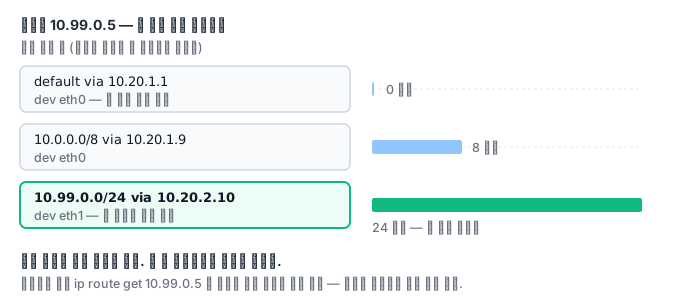
If the routing table has default via 10.20.1.1 and 10.99.0.0/24 via 10.20.2.10, then 10.99.0.5 goes by the latter line. The longer prefix wins, and the order in which the lines are written does not matter. ip route get 10.99.0.5 asks the kernel directly for this decision and gets the answer — more accurate than reading the table and inferring it yourself.
Linux is not a router by default. It drops packets that are not addressed to itself. net.ipv4.ip_forward=1 changes that, and the value is separate for each namespace. Docker hosts, Kubernetes nodes, and VPN servers all have this value at 1.
Name resolution starts when an application calls libc's getaddrinfo. Following the hosts: files dns order in /etc/nsswitch.conf, it looks at /etc/hosts first, and if the name is not there, asks the stub in resolv.conf, and the stub looks at the link settings and passes the query upstream. dig skips all of these layers and asks the server directly. So you use dig to see what the server answers and getent hosts to see what the application sees.
What it looks like in the field
The way back. You attached a new range and put a route on the router. Ping does not work. The router on the other side does not know the route back to the new range. The request arrived and the reply got lost. If you run ip route get on both sides, only one side points somewhere wrong with its default.
A port 53 conflict. You installed dnsmasq and it will not start. ss -ulpn 'sport = :53' shows that systemd-resolve is holding 127.0.0.53. The fix is to make dnsmasq hold only its own address with listen-address and bind-interfaces.
When name resolution is slow or odd
Even when routing is correct, the cause of slowness is often on the name-resolution side. Because there are several layers, you cannot see where the time goes.
A search domain gets appended. If resolv.conf has several domains in its search list, then when you look up a short name the resolver tries them in turn, appending each entry in the list. The more a name does not exist, the more attempts are made, and if the server answers slowly the delay is multiplied accordingly. This is the classic cause of slow external-domain lookups inside a Kubernetes Pod, and it is why the fix is to add a trailing dot and query an absolute name.
IPv6 is asked at the same time. getaddrinfo asks for both A and AAAA, and if one query is lost, it waits until the timeout and then retries. That produces the symptom "it sometimes hangs for about 5 seconds". 5 seconds is usually the resolver's default timeout, so read a round-number delay as a signal to suspect a timeout.
The cache is stale. If you changed an address and the old value keeps coming back, you have to work out which layer's cache it is. The application itself may be holding the result (the Java runtime is the typical case that caches for a long time), the stub resolver may be holding it, or the upstream server may be holding it for the TTL. The standard practice is to lower the TTL in advance and then change the address; if you lower the TTL on the day of the change, it is already too late.
The diagnostic order is the same as the principle above. First check with getent hosts what answer the application actually sees, and if that looks wrong, look at /etc/hosts and the stub settings, and only when you suspect the server itself, ask it directly with dig. If you start with dig, you skip the layers, and you end up with only the conclusion "the server is fine" without having reproduced the problem the application experiences.
What you will do in the next lab
You build host–router–host with three namespaces, put in a default route, ip_forward, and a static route, and count the hops with traceroute. Then you set up your own DNS server with dnsmasq and attach it to a resolved routing domain, and check side by side with getent and dig that /etc/hosts beats DNS.