
Network Fundamentals — Hands-on in a Linux VM
Neighbor or Not — Address, Mask, ARP
In one line
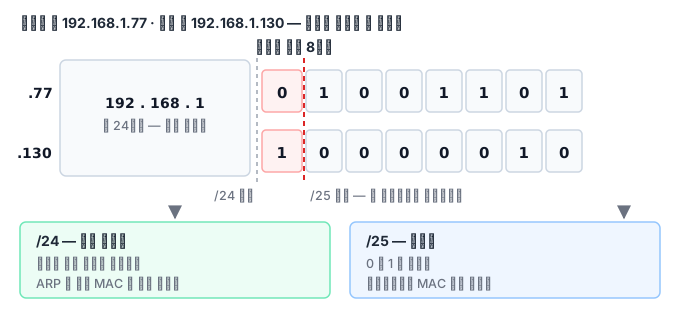
The first decision the kernel makes before sending a packet is "Is the peer on the same subnet?" If it is, the kernel asks for the peer's MAC directly with ARP. If not, it sends the frame to the gateway's MAC. One bit of the mask is what decides the fork.
Why this exists
An IP address is a logical address that says where a host is, while the thing that actually delivers a frame is the MAC address burned into the NIC. The two have nothing to do with each other. So to send to a peer on the same cable (the same L2), you have to ask "Whoever has this IP, what is your MAC?", and that is ARP. The answer stays for a while in the neighbor table (the ARP cache).
The problem is a peer that is not on the same cable. A broadcast cannot cross a link, so ARP cannot find it. That is why the kernel first uses the mask to decide "Is it on the same subnet?", and if not, it looks up the gateway in the routing table and builds the frame with the gateway's MAC. This is why the gateway must be on the same subnet — you have to be able to ask for its MAC.
How it works
Say you send from 192.168.1.77/25 to 192.168.1.130. With /25 the first 25 bits are the network, so the split falls at 128. 77 is in the 0–127 block and 130 is in the 128–255 block. They are on different subnets, so the kernel looks for a gateway. Put the same two addresses under /24 and they fall in the same block, so the kernel asks directly with ARP. Not one address changed, yet one bit of the mask changes the path completely.
An ARP request is a broadcast whose destination MAC is ff:ff:ff:ff:ff:ff. Only the host that sees its own IP answers, and it answers by unicast. The kernel puts the answer in the neighbor table (REACHABLE), switches it to STALE if it is unused for a while, and checks again the next time it is used. If you pin a static entry with nud permanent, the kernel does not refresh it — so if you pin a wrong MAC, the IP and routing look fine while communication silently dies. The peer's NIC just drops the frame as "not mine", and no error comes back.
What it looks like in the field
A mask typo. On a new server, someone wrote /16 instead of /24. Traffic within the same /24 works fine. But for a packet going to the neighboring range (another /24 inside the same /16), the kernel considers it "the same subnet" and sends an ARP request that gets no answer. It fails trying to find the host directly when it should have gone through the gateway. The symptom is "only some ranges don't work", and the clue is FAILED entries piling up in ip neigh.
A duplicate IP. If two devices have the same IP, two ARP replies arrive and the later one wins. Communication works on and off. If you catch the MAC in the neighbor table changing, the cause becomes visible.
Addresses that are easy to confuse
Not every address in a subnet is usable by a host. In 192.168.1.0/24, .0 is the network address and .255 is the broadcast address, so neither can be assigned to a host, and the usable count is 254, not 256. The narrower the mask gets, the bigger this loss is. A /30 has only 2 usable addresses out of 4, which is why /30 has traditionally been used on links between routers. These days such links use /31: by convention, a point-to-point link needs no broadcast, so both of the 2 addresses go to hosts.
Some ranges have fixed meanings, so you can often guess the cause from the symptom alone.
| Range | Meaning | If you see it |
|---|---|---|
127.0.0.0/8 |
Itself | Never leaves the machine. If you bind a service only here, other hosts cannot reach it |
169.254.0.0/16 |
Link-local | An address the host assigned itself after failing to get one from DHCP. The classic case of "it has an address but cannot communicate" |
10/8·172.16/12·192.168/16 |
Private ranges | Cannot go out to the internet as-is. NAT must be in the path |
224.0.0.0/4 |
Multicast | Only hosts that subscribed to a given group receive it |
You can also attach several addresses to one interface. In that case the kernel chooses the source address of outgoing packets. The default rule is "the first address on the same subnet as the destination", so if the peer's firewall allows only a particular source, traffic seems to pass some days and get blocked on others. Running ip route get <상대 주소> tells you exactly which source and which route the kernel will actually pick (replace the placeholder with the peer's address), so it is faster to confirm with this command than to guess.
Finally, it helps to know two variants of ARP. Gratuitous ARP announces "this IP is my MAC" when nobody has asked, and it is used to immediately update the neighbor tables around it when a virtual IP is handed over to another device. The incident in which, after a failover, traffic keeps going to the dead device for a while is usually a case where this announcement was never sent or was filtered by a switch in between. Proxy ARP is a router answering on behalf of someone else's IP; it looks convenient, but it makes it hard to trace which device answered, which gets seriously in the way of finding the cause.
What you will do in the next lab
You read interfaces and addresses with ip -br and ip -j, calculate subnets with ipcalc and Python, and attach addresses to a dummy interface. Then you connect two namespaces with a veth pair, capture the ARP request and reply with tcpdump, and put a wrong MAC in a static entry to see communication die for yourself.