
Names, inodes and Links
In one sentence
On Linux, a file name is not the thing itself; it is only a reference that points to the thing. Everything we learn today follows from this one sentence.
Why this matters
On a production server, logs have filled the disk. You delete a large log file with rm, yet the free space reported by df does not grow by a single byte. Everyone runs into this once, and everyone panics once.
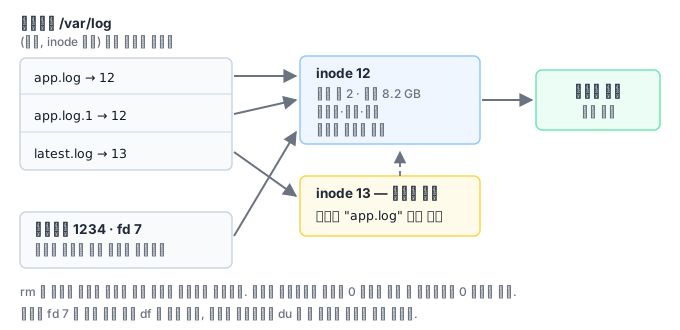
If you conclude here that "rm didn't work," the night gets long. What actually happened is this: rm is not a command that erases a file; it is a command that detaches one name from a directory (unlink). For the data blocks to be released, two conditions must hold at the same time.
- No names remain that point to the thing, and
- No process has it open.
If the application that was writing the log still has the file open, the second condition fails. The name is gone but the data is alive, and because du counts by walking paths, it never finds that nameless file. The moment df and du disagree is the signal for this situation.
How it works
You need to tell three things apart.
| Concept | What it is | Does it hold the name? |
|---|---|---|
| inode | The thing itself: size, permissions, owner, timestamps, link count, data block locations | No |
| Directory entry | A (name, inode number) pair | The name lives only here |
| File descriptor | A number that refers to a file a process has opened | No |
A directory is, in the end, just a list of these pairs. That is why all of the following is explained naturally.
- Hard link: another name attached to the same inode. In
ls -lithe inode numbers are the same and the link count is 2. Deleting the original leaves the other name, so the data stays. However, an inode number is unique only within one filesystem, so a hard link works only within the same filesystem and cannot be made to a directory. - Symbolic link: a separate file that holds a path string. It has a different inode, and it breaks when the original disappears. In return, it can cross filesystems.
- Renaming (mv): within the same filesystem, no data is moved at all. Only the directory entry is rewritten. That is why moving a 1GB file finishes instantly.
What you see in the field
First, recovering a deleted log. If a process still has the file open, a symlink to that file remains alive under /proc/PID/fd. Find it with ls -l /proc/1234/fd | grep deleted, then run cp /proc/1234/fd/7 /backup/recovered.log to salvage the whole content. The most important thing here is the order: the moment you restart the process, the chance of recovery disappears with it. In this situation, the first action should be copying, not restarting.
Second, generational backups that blow up in size. rsync's --link-dest makes generational backups cheap by linking unchanged files as hard links. But if you copy that backup directory with a tool that does not know about hard links, the size jumps several times over. You have to specify an option that preserves links, such as rsync -aH, and -H is not included in -a.
Third, inode exhaustion. ext4 fixes the number of inodes at format time and cannot increase it later. When session files or a mail queue create millions of small files, inodes run out first even though blocks remain, and you get No space left on device. That is why capacity alerts must cover both df -h and df -i.
A structure that keeps logs from eating the disk
After going through the incident above, the work does not end with recovering that file. Making sure the same thing does not happen again is the real point, and it makes direct use of the property that names and things are separate.
There are two ways to rotate logs, and the incident above happens when one of them is used wrongly.
Move and send a signal. Rename the file (this finishes instantly because it is the same filesystem) and send the application a signal saying "reopen the log file." When the application opens a new file, the last reference to the old file disappears and the space is reclaimed. If you do not send the signal, or the application does not handle it, it keeps writing to the old file, and that is the "I deleted it but it didn't shrink" situation we saw earlier.
Copy and truncate. Copy the content to another file, then truncate the original to length 0. Because the file descriptor stays the same, you do not need to touch the application. The trade-off is that logs written between the copy and the truncate may be lost, and for a large file the disk usage briefly doubles at that moment.
Which one is right is decided by the application. If the program handles the signal, the first method is better; if it does not, the second is the only option. Using the rotation settings without making this judgment and leaving the defaults is where the incident starts.
And in today's container environments, it is more common for the application not to write to files at all. It emits only to standard output, and the runtime and the collector take care of rotation and retention. This makes the rotation-signal problem disappear entirely, but if you do not check the runtime's rotation settings, the same incident of a node disk filling up with logs happens again, only one layer down. Whichever structure you use, the key is knowing who is supposed to delete.
What you will do in the next lab
Create a workspace under /root/work, create hard links and symbolic links yourself, and see with your own eyes how the inode numbers and link counts change. Finally, bundle the whole log directory into an archive.