
Addresses, Subnets and Gateways
Calling Yourself by Your External Address From Inside
In one line
When you connect to your own public domain from inside your home, the packet goes to the router and then has to come back, and many routers cannot do that. This is called hairpin NAT (or NAT loopback).
Why it was needed
It is common to run a server at home, expose it as labhub.hopto.org, and find that it works from outside but not from a laptop inside the house. The cause is this.
- The laptop (192.168.0.10) looks up
labhub.hopto.org→ the public IP (1.2.3.4) comes back - The laptop sends a packet to 1.2.3.4 → it is outside its own subnet, so it goes to the router
- The router realizes that 1.2.3.4 is itself, and according to the port forwarding rule changes the destination to 192.168.0.20 (the server)
- The server replies. But the source of the reply is 192.168.0.20, and the laptop is waiting for a reply coming from 1.2.3.4
- The laptop sees that reply as a "connection I never made" and drops it
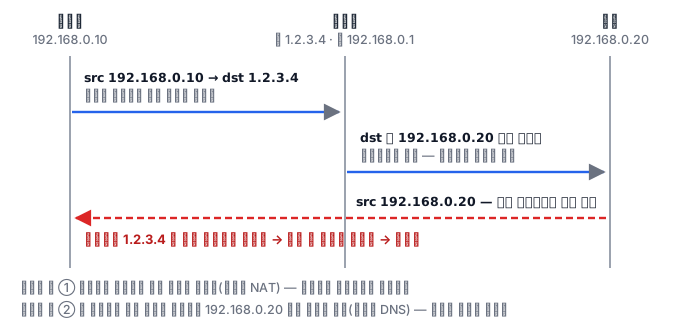
The packet makes a U-turn at the router, which is why it is called a hairpin. To fix it, the router has to change not only the destination but also the source to its own address (apply SNAT as well). Then the server replies to the router, and the router passes the reply back to the laptop.
How it works
Checking for the symptom is simple.
# 밖에서는 되는데 안에서만 안 되는가?
curl -sI https://labhub.hopto.org        # 집 안에서 → 타임아웃
curl -sI http://192.168.0.20             # 사설 주소로 직접 → 됨
If the internal address works and the domain does not, it is hairpin.
How to fix it
If the router supports hairpin, turn it on (the setting name differs by vendor — NAT Loopback, Hairpin NAT, allow internal access).
If it does not, the standard solution is split-horizon DNS. The same domain returns a private address when asked from inside and a public address when asked from outside.
- Put
labhub.hopto.org → 192.168.0.20into an internal DNS (for example the router's DNS, Pi-hole or CoreDNS) - Then devices in the house never go to the router in the first place
There is one more reason this approach is better. Hairpin sends traffic back and forth to the router, so even though the traffic stays inside the house, it is bound by the router's performance. With split DNS, it ends inside the switch.
Common misconceptions
Patching it with the hosts file. One laptop works, but phones and tablets do not. The right fix is at the DNS layer.
The belief that it is over if the public IP changes. With DDNS the public IP follows along, but the private address you hardcoded in the internal DNS has to be fixed by hand when you move the server. Keep in mind that there are two places to manage.
Things that look different inside and outside
Hairpin is one example of a bigger problem: "the same name takes a different path depending on where you are." If you also know the other symptoms that come from the same root, you can guess where to look when you meet an unfamiliar one.
The certificate name does not match. If you connect directly to a private address from inside, the domain written in the certificate differs from the address you connected to, and a warning appears. That is why it matters to use split DNS so that the name stays the same and only the address differs. If you make people connect by address, this problem follows.
The source of the access log looks the same for everything. If a router or proxy rewrites the source to its own address, the server-side log shows every request as coming from one address. Then you cannot find a particular user, and blocking or rate limiting by source becomes meaningless. Even if the proxy carries the original address in a header, you can trust that header only when it was added by a proxy we control. If you trust a value that arrived from outside as it is, anyone can forge their own address.
The same service is slow only from inside. If traffic goes out to the router or gateway and comes back, the path gets longer even though the device is physically next to you, and the latency grows. This is the point made earlier when we said that split DNS ends inside the switch.
To sum up, there is one principle. Keep the name the same everywhere, and let only the address it points to differ by location. If you split the name (create a separate internal-only domain), certificates, configuration and documentation all become two copies, and one day only one side gets fixed and they quietly start to drift apart. Which of the two copies is right usually becomes clear only after an outage. The rule of keeping one name is not a convenience but a device for reducing incidents. The same goes for services used only internally: giving them a proper name and certificate from the start is much cheaper when you later open them to the outside.
What really matters in practice
Kubernetes has the same problem. If a Pod calls itself through its own Service's external address (the LoadBalancer IP), you get the same hairpin situation. With externalTrafficPolicy: Local, the node does not perform SNAT, so in this case the reply may not be able to return.
So inside a cluster, always call by Service name (svc.namespace.svc.cluster.local). Do not call yourself by the external address — this one line removes half of the hairpin problems.