
3D Math and a Software Rasterizer
What a Rasterizer Does
In one line
A rasterizer takes three vertices, picks the pixels that fall inside them, and blends the values attached to the vertices with barycentric coordinates and hands them to each pixel. The depth buffer decides front from back, pixel by pixel.
Why this was needed
After the previous steps, vertices have screen coordinates. But the screen is a grid of pixels, and the edges of a triangle do not fit the grid exactly. You need a rule that decides which pixels count as belonging to this triangle.
And the color exists only at the vertices. Where does the color of a pixel inside the triangle come from? You have to blend the values of the three vertices according to distance, and what defines "according to distance" precisely is barycentric coordinates.
Finally, when there are several objects, you have to decide which one is in front. The approach of sorting per triangle and drawing from the back (the painter's algorithm) has no answer when triangles pierce each other or overlap cyclically. That is why hardware chose to remember depth for every pixel.
How it works
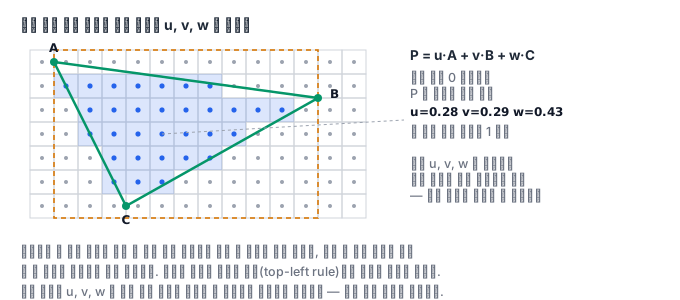
Barycentric coordinates are the (u, v, w) you get when you write a point P as a weighted sum of the three vertices, P = u*A + v*B + w*C. The three values always sum to 1, and if all three are 0 or greater, P is inside the triangle. This solves the inside-outside test and value interpolation at the same time.
d = (By-Cy)(Ax-Cx) + (Cx-Bx)(Ay-Cy)          # 삼각형 넓이의 두 배(부호 있음)
u = ((By-Cy)(Px-Cx) + (Cx-Bx)(Py-Cy)) / d
v = ((Cy-Ay)(Px-Cx) + (Ax-Cx)(Py-Cy)) / d
w = 1 - u - v
A real implementation scans only inside the triangle's bounding box. This is much faster than going over the whole screen, and GPUs do the same thing in units of tiles.
Not only color but depth is interpolated the same way. Once you have the pixel's depth, you compare it with the depth buffer value at that position and write the color and depth together only if it is closer. This is the z-buffer, and it gives the same picture regardless of the drawing order. Order independence is the real value of this method — unless something is translucent, sorting becomes unnecessary.
Back-face culling filters earlier than that. Whether the three vertices go around clockwise or counterclockwise in screen coordinates can be told from the signed area.
signed_area = ((Bx-Ax)(Cy-Ay) - (Cx-Ax)(By-Ay)) / 2
For a closed object, the back faces are hidden behind the front faces anyway, so this single sign lets you discard half of the triangles before rasterization. It is a factor of two for free.
There is one more trap in interpolation. If you simply blend values with barycentric coordinates computed in screen coordinates, you get a wrong result in a scene with perspective. This is because intervals divided evenly on the screen are not even in 3D space. You hardly notice it for color, but textures are clearly warped. The correct method is to interpolate the values while they are divided by w and then restore them at the end, and this is called perspective-correct interpolation. You will see this warping with your own eyes in the shader course.
It is also worth knowing that the GPU does not process pixels one at a time but in 2x2 blocks. For a fragment shader to choose a texture's level of detail, it needs to know the difference from neighboring pixels, and that difference is computed within the block. So if a triangle is very thin, more than half of the block becomes computation that gets thrown away, and the more finely you cut triangles, the bigger this waste gets.
What it looks like in the field
There is a bug where a one-line gap appears between two adjacent triangles. It happens when the pixels on the shared edge are judged to belong to neither side. Conversely, if both sides claim them, the pixel is drawn twice and the color gets darker in translucent compositing. That is why the specification defines a fill rule (top-left rule) that gives each boundary pixel exactly one owner.
Another is z-fighting. If two surfaces are at almost the same depth, front and back wobble within the precision of the depth buffer and the screen shimmers. The fixes are to actually separate the two surfaces, to apply a depth offset, or to increase the near plane.
And back-face culling is safe only for closed objects. If you turn it on for something you must see from both sides, like a sheet of paper or a leaf, it disappears entirely at certain angles.
Finally, here is one sense of performance to keep. The cost of rasterization is roughly proportional not to the number of triangles but to the number of pixels filled. One big triangle that fills the screen is more expensive than a thousand small triangles off screen. So optimization splits in two directions. One is to discard in advance what will not appear on screen (frustum culling, back-face culling, occlusion tests), and the other is not to paint the same pixel several times. The latter problem is called overdraw, and if you draw opaque objects from front to back, the depth test filters first, so fragment computation drops. The depth buffer makes sorting unnecessary, but it still means that a rough sort pays off for performance.
What you will do in the next lab
You build barycentric coordinates yourself, fill a triangle with them, and then interpolate the vertex colors. Next, you give depth to two overlapping triangles, separate front from back with a z-buffer, and see with your own eyes how the picture changes when you only swap the depths. Finally, you use the signed area to pick out the back faces and discard them.