
3D Math and a Software Rasterizer
How a Single Point Reaches the Screen
In one line
A vertex starts in model coordinates, passes through world, view and clip coordinates, and becomes a screen coordinate only after it is divided by w. Perspective comes from this single division.
Why this was needed
The person who made an object models it near the origin. The person dressing the scene places that object somewhere in the world. The person holding the camera sees the world relative to their own position and direction. The side that draws to the screen knows only pixel coordinates. Because these four people all use different references, you need steps that switch between coordinate systems.
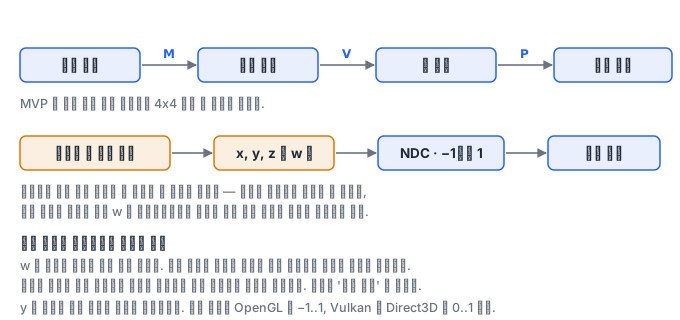
What is decisive here is that each step can be expressed as a single matrix. If you multiply the model, view and projection matrices in advance into one MVP, one 4x4 multiplication per vertex is all it takes. What the vertex shader does is, in effect, this one line.
How it works
The view matrix is the transformation that moves the camera to the origin and the direction the camera looks in onto the -z axis. Think of it not as moving the camera but as moving the world the opposite way. To build it, you find the camera's three axes and stand them up as row vectors.
f = normalize(target - eye)      # 보는 방향
s = normalize(cross(f, up))      # 오른쪽
u = cross(s, f)                  # 진짜 위쪽 (up 은 대충 준 값이라 다시 구한다)

view = |  s.x   s.y   s.z   -dot(s, eye) |
       |  u.x   u.y   u.z   -dot(u, eye) |
       | -f.x  -f.y  -f.z    dot(f, eye) |
       |   0     0     0          1      |
The reason the third row has a minus sign is that, in a right-handed coordinate system, we agreed that the camera looks down -z. If you break this agreement, the object ends up behind the camera and you see nothing.
The projection matrix squeezes the space inside the frustum into a cube. The last two rows of a perspective projection matrix are the core of this job.
t = 1 / tan(fov/2)

proj = | t/aspect  0        0                 0             |
       | 0         t        0                 0             |
       | 0         0   -(f+n)/(f-n)   -2*f*n/(f-n)          |
       | 0         0       -1                 0             |
Look at the last row being (0, 0, -1, 0). Because of this row, the w component of the result becomes -z, that is, the distance from the camera. Then if you divide x, y and z by this w, points that are farther away are pulled toward the center of the screen. This is the perspective divide, and all of the perspective comes from here. A matrix multiplication alone does not produce perspective — because a matrix cannot express a division, it takes the detour of loading the distance into w and dividing later.
The coordinates after the division are called normalized device coordinates (NDC), and their range is -1 to 1. Finally, a viewport transform is applied to map them to pixel coordinates. Flipping y also happens at this point.
sx = (ndc_x * 0.5 + 0.5) * 화면폭
sy = (1 - (ndc_y * 0.5 + 0.5)) * 화면높이
An orthographic projection does not touch w. The last row is (0, 0, 0, 1), so the division becomes the identity, and therefore size is the same regardless of distance. Technical drawings and 2D UIs use this.
The reason you must clip before the division comes from here as well. If w is 0 the division blows up, and if w is negative the point is behind the camera. If you simply divide a point behind the camera, the sign flips and it appears at a perfectly valid coordinate on the opposite side of the screen. The bug where a triangle straddling the front and back of the camera stretches across the screen is this. That is why the pipeline clips outside the frustum before the division, while the coordinates are still clip coordinates. This is where the name clip coordinates comes from.
Depth also goes into the viewport transform. It is the step that maps the z of NDC to the range the depth buffer uses, and the default is -1..1 in OpenGL and 0..1 in Direct3D and Vulkan. Because of this difference, the third row of the projection matrix differs between APIs, and if you port someone else's code as is, the depth test is flipped or half of the scene is cut off.
What it looks like in the field
If you set the near plane too small (a value like 0.001), the precision of the depth buffer is concentrated close to the camera and z-fighting appears between distant objects. This is because depth values are distributed in proportion to 1/z, and this fact can be read directly from the third row of the matrix above. The practical fix is not to reduce far but to increase near.
Another is the aspect ratio. If the window size changes and you do not update the aspect of the projection matrix, objects get stretched. This is why you must rebuild the projection matrix in the window-resize callback.
What you will do in the next lab
You build the view matrix and the perspective and orthographic projection matrices yourself, and draw the twelve edges of a cube on the screen through the perspective divide and the viewport transform. You draw the same cube in perspective and in orthographic projection and compare them, and check both in numbers and in pictures how widely the object is captured on screen as you change the field of view.