
Apache Flink — Running Streams on a Real Engine
Window TVFs — Functions That Add Three Window Columns to Each Row
In one line
A window in Flink SQL is a function that takes a table and returns a table (a window TVF). TUMBLE, HOP, CUMULATE, and SESSION merely return the original rows with three columns attached, window_start, window_end, and window_time, and aggregation and Top-N are ordinary SQL that groups by those columns. The kind of window decides just one thing — how many windows, and which ones, a row goes into.
Why this was needed
As seen in the previous module, an unbounded aggregation like GROUP BY user_id keeps rewriting its result endlessly and holds state forever for each key. That is usually not what a dashboard wants. "Sales per shop every 10 minutes", "the number of orders in the last 10 minutes, refreshed every 5 minutes", "cumulative sales from midnight today until now", "a session from when someone comes in until they leave" — all of these are aggregations over intervals cut by time. When an interval closes, you emit the result once and throw the state away.
The old Flink SQL did this with special syntax such as GROUP BY TUMBLE(ts, ...) (Grouped Window Functions). It could be used for aggregation, but not for ranking within each window or joining two streams on the same window. The official docs (Windowing TVF) say window TVFs replace that syntax. Once a window became "a function that attaches columns to rows", you could put anything on top of a window — window aggregation, window Top-N, window join, window deduplication.
How it works
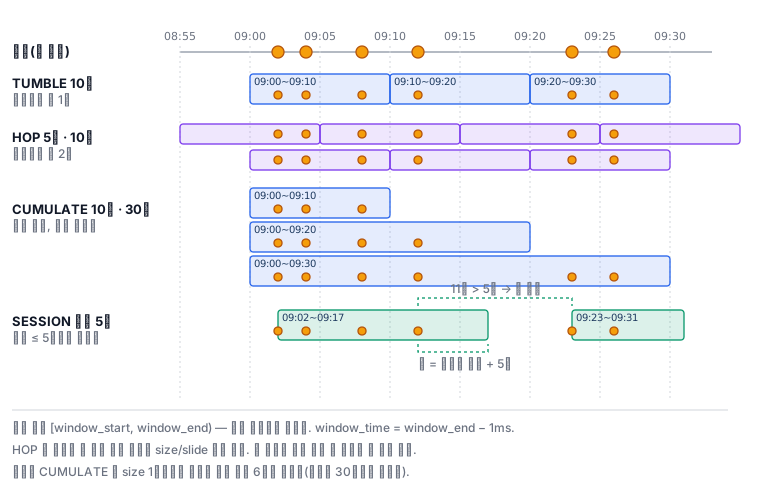
A window TVF is written in the FROM position. The first argument is the table, the second is the time attribute column, and the rest are sizes.
SELECT window_start, window_end, shop, COUNT(*) AS cnt
FROM TUMBLE(TABLE orders, DESCRIPTOR(ts), INTERVAL '10' MINUTE)
GROUP BY window_start, window_end, shop;
| TVF | Arguments | Number of windows a row goes into | Overlap |
|---|---|---|---|
TUMBLE |
size | 1 | None |
HOP |
slide, size | size / slide | Yes |
CUMULATE |
step, size | All windows with the same start whose end is later than that row | Yes |
SESSION |
(PARTITION BY key) gap | 1 | None, sizes vary |
A few rules decide the result.
A window is a half-open interval. [window_start, window_end) — an order stamped exactly at 09:10:00 goes not into [09:00, 09:10) but into [09:10, 09:20). As the docs say, window_time is always window_end − 1ms, and in streaming this column remains a time attribute that can be used in the next window operation. By contrast, window_start and window_end become ordinary timestamps and are not time attributes.
Window starts are aligned to the epoch. A 10-minute window starts at 00, 10, and 20 minutes past the hour, and even if the first row arrives at 09:01:35, the window starts at 09:00. The optional argument offset shifts this.
The argument order of HOP and CUMULATE is a trap. In both, the smaller value (slide, step) comes first and the larger value (size) comes after. If you write them the other way round, the job is rejected before it starts — in the lab environment, HOP gave the error 'size must be an integral multiple of slide' and CUMULATE gave 'maxSize must be an integral multiple of step'. That is, size must be an integer multiple of slide (step). In HOP(5 minutes, 10 minutes), a row goes into two windows, so adding up the per-window counts gives twice the original number of rows. This is not a bug but the definition. CUMULATE is, in the wording of the docs, "a TUMBLE by size, with the inside split into windows whose ends grow by step", so with a one-hour window and a 10-minute step you get six windows with the same start.
SESSION has no size. If the gap between neighboring rows of the same key is at or below the gap, they join into one session, and the end of a session is the last row + gap. So each session has a different length. According to the docs, the SESSION TVF does not yet support batch mode.
A window operation emits only once at the end. The docs (Window Aggregation) say a window aggregation does not emit intermediate results, emits only the final result when the window ends, and clears all state that is no longer needed. So the result log has only +I. The judgment that a window has "ended" is made by the watermark of the previous module.
A window Top-N is partitioned by the window columns. Only when PARTITION BY has the two window columns, as in ROW_NUMBER() OVER (PARTITION BY window_start, window_end ORDER BY ...), does the optimizer translate it into a window Top-N. Then, unlike a general Top-N, it does not emit -U/+U every time the ranking changes but emits only the top N once when the window closes. You can put it on top of a window aggregation, or directly on top of a window TVF to rank the rows themselves. According to the docs, a window Top-N directly on top of a TVF supports only TUMBLE, HOP, and CUMULATE.
What it looks like in the field
If you build a "last hour every 5 minutes" dashboard with HOP, one row goes into 12 windows. State and computation grow by that much, and if you add up the per-window counts and use them as the "total number of orders", it is inflated 12 times. It is also common to imitate a cumulative metric ("today so far") with HOP, but for that place CUMULATE, whose start is fixed, is the right choice.
The second is ranking instability. If two orders with the same amount compete for third place, ROW_NUMBER picks one of the two. It does not guarantee which, so it can differ on reprocessing. You need the habit of breaking ties by adding a secondary key such as the order number to the sort key. The data in this lab was made so that there are no ties in the amounts or in the per-window sales.
The third is the time zone. This lab uses TIMESTAMP(3), so windows are cut at the times as written. If you make a daily window on a TIMESTAMP_LTZ column, the boundary of "a day" changes with the session time zone. If a daily window is cut at 9 a.m. Korean time, look at this first.
What you will do in the next lab
You apply a 10-minute TUMBLE to 119 orders to see how the window columns are attached, and produce a 10-minute aggregation per shop. You confirm that the sum of the counts of HOP (5 minutes, 10 minutes) doubles, that CUMULATE (10 minutes, 1 hour) produces six windows with the same start, and that SESSION (5-minute gap) creates sessions of different lengths per shop. You pick the top two shops by sales for each 10-minute window and the three large orders for each 30-minute window with window Top-N, and write up the numbers as a report.