
Apache Flink — Running Streams on a Real Engine
Deduplication and Top-N — same ROW_NUMBER, different changelogs
In one line
Deduplication and Top-N in Flink SQL are the same pattern, ROW_NUMBER() OVER (PARTITION BY ... ORDER BY ...) with a row-number condition attached. But if you keep the first row, the result is append-only, while if you keep the last row or rank rows, it becomes an update log that retracts and fixes rows already emitted. Which one it is decides the downstream sinks and aggregations.
Why this was needed
The example the official docs give is just how things are in reality. If the upstream ETL cannot guarantee exactly-once from end to end, the same record goes into the sink twice during failure recovery. If you do SUM or COUNT in that state, the numbers get inflated. So you have to clear out the duplicates before analysis.
But "duplicate" has two meanings mixed together. One is the same event arriving twice (a resend) — you only need to keep the first one. The other is the state of the same subject changing several times (an order goes created → paid → shipped) — you have to keep the current state, that is, the last one. The two requirements differ by one word in SQL, ASC and DESC, but inside the engine they do completely different things. The first row is done once it is emitted, but the last row keeps changing because "the last so far" keeps changing.
How it works
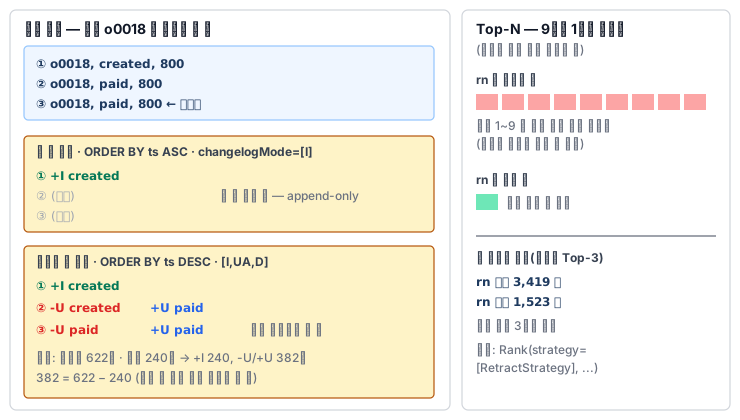
You have to follow the pattern exactly. The docs define deduplication as ROW_NUMBER() · PARTITION BY 키 · ORDER BY 시간 속성 · an outer WHERE rownum = 1 (where the placeholders stand for the key and the time attribute), and say you must follow this shape exactly for the optimizer to recognize it. The ORDER BY must be a time attribute (processing time or event time), and ASC keeps the first row while DESC keeps the last row. In theory, deduplication is the special case of a Top-N with N equal to 1 sorted by time.
In the plan, the two part ways like this. The physical plan of EXPLAIN CHANGELOG_MODE writes this operator as Rank(strategy=[AppendFastStrategy], rankRange=[rankStart=1, rankEnd=1], ...) with the kind of change it emits attached at the end of the line. In the execution plan, the same place becomes a Deduplicate node.
물리 계획  Rank(... orderBy=[ROWTIME ts ASC] ...)   changelogMode=[I]
실행 계획  Deduplicate(keep=[FirstRow], key=[order_id], order=[ROWTIME], outputInsertOnly=[true])

물리 계획  Rank(... orderBy=[ROWTIME ts DESC] ...)  changelogMode=[I,UA,D]
실행 계획  Deduplicate(keep=[LastRow], key=[order_id], order=[ROWTIME], outputInsertOnly=[false])
Keeping the first row puts only an "already seen" marker in state for each key and discards from the second row on. The result is insert-only, so it goes as it is even into append-only sinks such as files. Keeping the last row holds the last row so far for each key in state, and when a new row arrives, it retracts the row emitted earlier and emits the new row. In the measurements, I put in 622 event rows and 240 orders and got 240 +I and 382 pairs of -U/+U. 382 = 622 − 240, that is, one pair for every second-and-later row of the same key. A pair came out even when a completely identical row was resent. When sorting by processing time (PROCTIME()), pairs did not come out for 18 of the 41 resends from the same input — it is a sort that depends on arrival time, so such counts can vary with the execution environment, and the lab judges by event time.
Top-N is the same pattern with a row-number condition of <= N. The docs say Top-N is result-updating, so when the top N changes, it sends the changed rows as retractions and updates. If the input itself is updating (a ranking on top of a sales SUM), Rank(strategy=[RetractStrategy], ...) appears in the plan. The important choice here is whether to emit the row number. The row number column becomes part of the unique key of the result, so, as in the docs' example, when the product in 9th place goes up to 1st, all the rows of ranks 1–9 are sent again. If you drop the row number from the outer SELECT, you only need to send the one changed product. In the measurements, the per-category Top-3 of the same sales file had 3,419 log rows when the row number was emitted and 1,523 when it was dropped, and the final result was the same.
If you stack GROUP BY status on top of keeping the last row, the two operators mesh. When one order changes from created to paid, the deduplication emits -U created and +U paid, and the aggregation receives them, subtracts one from the created bucket, and adds one to the paid bucket. If you count the events as they are without deduplication, one order is counted in several buckets at once.
What was done in the previous module to build the versioned view for the temporal join is exactly this keep-the-last-row. The per-window Top-N was covered in the windows module — there it is emitted just once when the window closes, so there are no retractions.
What it looks like in the field
The most common mistake is "writing the deduplication result to a file or an append-only topic". Keeping the first row is fine, but the moment you change to keeping the last row, the result becomes an update log and cannot be put into a sink that cannot receive updates (the rejection seen in the dynamic tables module). It is best to separate the requirements first to see which of the two is needed. If you are clearing out resends, it is the first row, and if you need the current state, it is the last row.
The second is the log explosion of Top-N. If you write a real-time leaderboard to a key-value store and the write volume is several times what you expected, first check whether you are emitting the row number. If the screen can assign the rank itself, just dropping the row number greatly reduces writes.
The third is the sort criterion. If you deduplicate by processing time, the result depends on arrival order and can differ every time you rerun it. For a pipeline that must give the same answer even on reprocessing, use event time.
What you will do in the next lab
You define order status events and sales records and count the rows and the number of orders. You run keep-the-first-row and keep-the-last-row and confirm how the log counts differ, and compare the changelog modes of the two plans with EXPLAIN. On top of keep-the-last-row, you count the current status, run the per-category Top-3 with and without the row number to compare the log volume, and then write it up as a report.