
Apache Flink — Running Streams on a Real Engine
Checkpoints and savepoints — why a stopped and resumed job does not duplicate
In one line
A checkpoint is a photograph taken at one aligned moment of how far the source has read, what the operators are holding, and what the sink has not yet finalized. A file sink finalizes its files only after it is notified that the photograph is complete, so even if a job dies and comes back, the finalized results have neither gaps nor duplicates. A savepoint is a photograph taken by the same mechanism, but one that a person takes and keeps.
Why this was needed
Streaming jobs run for weeks. In the meantime TaskManagers die, code gets fixed and redeployed, and clusters are moved. At the moment of restarting, three things have to be decided at once. From where in the source to read again, how to bring back the state accumulated so far, such as sums and windows, and what to do with the results already sent out.
If you decide the three separately, they will surely drift apart. If you read again from the beginning, results already written go out twice, and if you continue reading from the last position read, the state is empty and the sums are wrong. Even if you save the state separately, if the moment of saving and the position of the source are off by even a few records, you count twice or miss by that much. What you need is a guarantee that "the three were the same moment". Flink solves this by sending markers through the data flow.
How it works
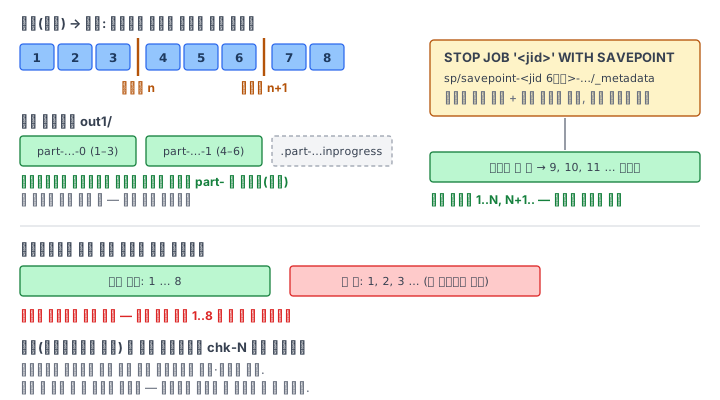
The barrier. The JobManager's checkpoint coordinator injects barrier n into the sources (Stateful Stream Processing in the official docs). The barrier flows downstream along the same path as records, and the moment an operator receives the barrier it takes a snapshot of its own state, stores it, and then passes the barrier down. The source's "state" is the position it has read — for a sequence source, the next number to emit. When all tasks report that they have taken their photographs, checkpoint n is completed, and the coordinator announces the completion again.
A file sink waits for this notification. A file the sink writes goes through three stages. While being written, its name starts with a dot, .part-…inprogress…; when it receives the barrier, it is closed and waits for finalization; and when the completion notification comes, it is renamed to part-… and finalized. By convention, dot files are hidden files that readers skip. So what downstream sees is always the result "up to some checkpoint", and the checkpoint interval is the delay until results become visible. If you run it at a 1-second interval on this Pod, one part file is added every second, and dot files appear only briefly between checkpoints and disappear.
Where it is stored. If you give execution.checkpointing.dir, it is stored in a file system. The structure the docs describe is <dir>/<job-id>/chk-<n>/, and the _metadata inside is the table of contents of the photograph. By default, checkpoints are not retained — when a new checkpoint completes, the old one is deleted, and when the job is cancelled, all are deleted. They are for failure recovery, not left for people to use. If you want to keep them, set execution.checkpointing.externalized-checkpoint-retention to RETAIN_ON_CANCELLATION.
A savepoint is taken by the same mechanism, but its owner is a person. It is created under <savepoint-dir>/savepoint-<잡 id 앞 6자리>-<무작위>/ (where the placeholders stand for the first six characters of the job id and a random suffix), and Flink does not delete it on its own. There is one trap the docs emphasize. Since Flink 1.15, an intermediate savepoint taken without stopping does not commit side effects. What finalizes files is the checkpoint and STOP ... WITH SAVEPOINT.
SET 'execution.checkpointing.savepoint-dir' = 'file:///root/flink/checkpoint/sp';
STOP JOB '<jid>' WITH SAVEPOINT;                       -- 찍고 멈춘다. 쓰던 파일까지 확정
SET 'execution.state-recovery.path' = 'file:/.../savepoint-xxxxxx-yyyy';
INSERT INTO sink SELECT id FROM seq;                   -- 같은 질의를 되살린다 — 다음 순번부터
A restored job receives both the savepoint's source position and sink state. So even if you change the sink path, the sequence continues, and if you merge the two directories, there are neither gaps nor duplicates. You can restore in exactly the same way from a retained checkpoint (docs: resume like a savepoint using the checkpoint's metadata file).
What it looks like in the field
The most common accident is redeploying without a savepoint. If you fix the SQL slightly and INSERT again, the new job starts with empty state and reads from the beginning of the source (or the configured start position). With a sequence source, it writes from 1 again. If the result directory is the same, rows that already exist go in once more. In this lab you count that overlap yourself.
The second is a job stopped by cancellation. Cancellation does not take a savepoint, so the dot files written after the last checkpoint remain in the directory as they are. If you restore from a retained checkpoint, the new job rewrites from the checkpoint time, and the results (files that do not start with a dot) still have no gaps or duplicates. But if you attach to downstream a tool that also reads dot files, duplicates arise at that moment. "Exactly once" is paired with the promise that you read only what is finalized.
The third is restore failure. A savepoint holds state per operator id. The docs warn that automatically generated ids are sensitive to the structure of the program — if you greatly change the shape of the SQL, it cannot find the operators to put the state into. When you modify a job that has state, first test "does the savepoint still go in after this change".
As seen in module 1, the restart strategy changes its default toward restarting when you turn on checkpointing. This module deals with where that restart goes back to.
What you will do in the next lab
You attach a sequence job that takes a checkpoint every second to a file sink, and while it runs, save a listing that shows finalized files and dot files together. You read the location of the last checkpoint from the /checkpoints response, stop with STOP JOB ... WITH SAVEPOINT, and then restore from the savepoint to see whether the sequence continues. Next you run anew without a savepoint to create an overlap, continue writing from the checkpoint you kept even after cancelling, and then recount all the numbers from the disk and write them up as a report.