
Why the Build Cache Breaks Exactly There
One-line summary
The cache key of each layer is computed from the parent layer's digest plus its own instruction. So when one layer breaks above, everything below it is run again regardless of its content.
Why this is needed
FROM node:22-bookworm-slim   # 1
WORKDIR /app                 # 2
COPY . .                     # 3  <- 소스 한 글자만 바뀌어도 여기서 깨진다
RUN npm ci                   # 4  <- 그래서 여기도
RUN npm run build            # 5  <- 여기도
Even if you fix a single line of a comment, the dependency installation runs again from the beginning. Docker does not know the meaning of an instruction; it only knows that the parent of the layer at that position has changed.
How it works
The way the cache key is computed differs by instruction type. If you do not know this difference, your diagnosis keeps missing.
- The cache key of
RUNis the command string itself. It does not look at what the command does. So a single lineRUN apt-get updatehits the cache forever, even months later. The real reason to putapt-get updateandinstallin the same RUN is not size but the cache. - The cache key of
COPY/ADDis the content hash of the target files.
Here an old misunderstanding needs correcting. The claim that "just opening and saving (touch) a file breaks the cache" is a story from the days of the old builder. The classic builder included the modification time in file metadata, but BuildKit looks only at the content hash, mode and ownership. Even if you do a fresh git clone in CI and the mtime of every file becomes the current time, the cache is unaffected. If the cache still breaks, the cause is somewhere other than mtime.
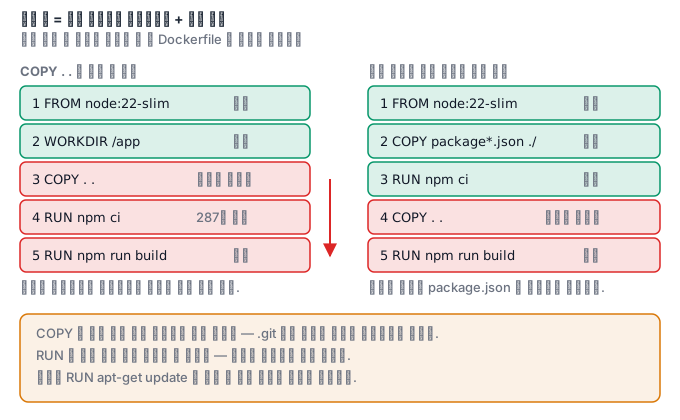
So there is only one solution. Move what changes often further down.
COPY package.json package-lock.json ./
RUN npm ci
COPY . .
RUN npm run build
What it looks like in the field
There are cases where only CI is unusually slow. The second build locally takes 4 seconds, but CI went from 90 seconds to 8 minutes, and looking at the log, a single RUN npm ci takes 287.4 seconds. The reason is simple — the cache lives in the builder's local storage, but a CI runner is a new machine on every run. So you need a separate setting that exports the cache to a registry, and if you leave out mode=max at that point, only the final stage is cached and the expensive builder stage runs again every time.
.dockerignore is also widely misunderstood. It is not an image size optimization tool but a transfer volume optimization tool. In measurements, context transfer dropped from 612.44 MB / 18.3 seconds to 3.71 MB / 0.4 seconds. However, if you use COPY . ., it affects the image size too, and the reason to exclude .env is not size but security.
Rules for when the cache breaks
A layer cache is reused when the layer immediately before it is the same and the instruction is also the same. When one line breaks, everything below it is rebuilt. So you move what changes less toward the top.
# ❌ 소스가 한 글자만 바뀌어도 의존성을 다시 받는다
COPY . /app
RUN npm ci

# ✅ package.json 이 안 바뀌면 npm ci 는 캐시에서
COPY package*.json /app/
RUN npm ci
COPY . /app
COPY decides by the checksum of file contents, and RUN looks at the command string only. So RUN apt-get update && apt-get install -y curl uses the cache if the command is the same, and uses the old package list even if the repository has been updated in the meantime. This is the cause of "the build succeeded but an old version went in".
.dockerignore protects the cache
The checksum of COPY . /app includes every file in the build context. The cache breaks whenever .git, node_modules or log files change.
.git
node_modules
*.log
.env*
__pycache__
There is one more side effect. When the context gets smaller, the amount transferred to the daemon shrinks and the build starts faster. Excluding just .git can sometimes cut hundreds of MB. And excluding .env is also a security matter.
BuildKit's mount cache
You can share the package cache between builds instead of putting it in a layer. Rebuilds get faster without increasing the image size.
# syntax=docker/dockerfile:1
RUN --mount=type=cache,target=/root/.npm     npm ci

RUN --mount=type=cache,target=/var/cache/apt     --mount=type=cache,target=/var/lib/apt/lists     apt-get update && apt-get install -y --no-install-recommends curl
Secrets go in the same way. If you pass them with --mount=type=secret, they do not remain in the layer.
RUN --mount=type=secret,id=npmrc,target=/root/.npmrc npm ci
You pass it with docker build --secret id=npmrc,src=$HOME/.npmrc .. Unlike copying the file and then deleting it, there is no trace in the layer.
Shrinking the final image with multi-stage
Build tools are not needed at run time. Build in a separate stage and move only the results.
FROM golang:1.23 AS build
WORKDIR /src
COPY go.* ./
RUN --mount=type=cache,target=/go/pkg/mod go mod download
COPY . .
RUN CGO_ENABLED=0 go build -o /out/app ./cmd/app

FROM gcr.io/distroless/static:nonroot
COPY --from=build /out/app /app
USER nonroot
ENTRYPOINT ["/app"]
The final image has no compiler, no source and no shell. The size shrinks and the attack surface shrinks too. In exchange, since there is no shell when debugging, you attach a tool container that shares the namespaces.
What you will do in the next lab
You will build twice from the same source and check whether the image IDs are the same, deliberately break an earlier layer and see everything below it run again, and prove that deleting does not shrink an image by the difference in size between two images.