
What Is an Image and What Is a Container
One-line summary
An image is a file tree built from stacked read-only layers, and a container is an ordinary Linux process running with one writable layer added on top of it.
Why this is needed
The explanation "a container is a lightweight VM" has been around for a long time, but it gives the wrong prediction for almost every practical problem. If you run ps on the host, the nginx inside the container is right there.
48213 root      nginx
48261 systemd+  nginx
Seen from inside the container, the same processes appear as 1 nginx and 29 nginx. There are not two sets of processes; it is the same process seen from a different namespace. Checking the kernel version makes this even clearer. The host, an alpine container and an ubuntu container all report the same kernel. What an image provides is not a kernel but only a user-space file tree.
How it works
Layers are stacked with a union filesystem (overlayfs).
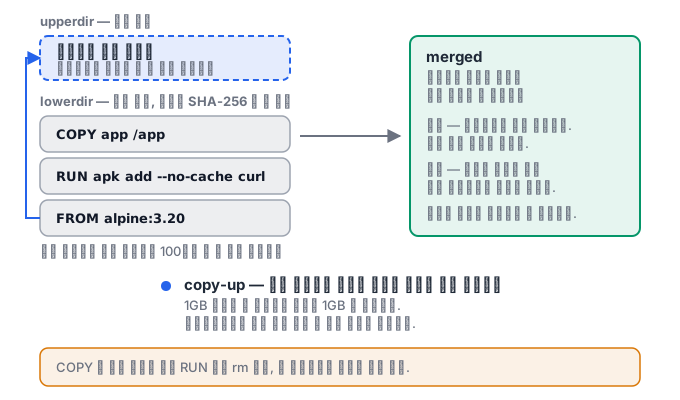
merged   <- 컨테이너가 보는 뷰
  ↑ upperdir  (쓰기 가능, 컨테이너 레이어)
  ↑ lowerdir  (읽기 전용, 이미지 레이어들이 겹겹이)
- Read: the lookup goes from the top down, and the topmost file wins.
- Write: if you modify a file in a lower layer, it is copied upward first (copy-up) and then modified.
- Delete: nothing is actually removed; a whiteout marker is left in the upper layer.
Every layer is named by the SHA-256 hash of its content. Identical content gets an identical name, so nothing is stored twice and integrity can be verified just by comparing hashes. This is also why an image ID looks like sha256:....
What gets decided the moment a layer is stacked
One instruction in a Dockerfile is one layer. And a layer is never erased. Most practical pitfalls come from these two sentences.
COPY secret.pem /tmp/secret.pem     ← 레이어 3에 파일이 들어간다
RUN ./setup.sh && rm /tmp/secret.pem  ← 레이어 4는 "지웠다" 는 기록일 뿐
In the final image /tmp/secret.pem is not visible, but it is still there in layer 3. Anyone can extract it by unpacking the image with docker save. Putting a secret into an image and then deleting it is not deleting it. Solve this with build secrets (RUN --mount=type=secret) or a multi-stage build.
For the same reason, the size does not shrink either.
RUN apt-get update && apt-get install -y build-essential   # +400MB
RUN apt-get purge -y build-essential                       # 여전히 +400MB
Only if you download and delete within a single RUN does the final state of that layer contain just the result.
What remains after you delete a container
When you delete a container, its writable layer disappears. So files you created inside a container vanish together with docker rm. This is why volumes are needed.
| Storage location | After the container is deleted | Write performance | When to use |
|---|---|---|---|
| Writable layer | Gone | Slow (copy-up) | Temporary files |
| Anonymous volume | Remains (hard to find because it has no name) | Fast | Something created by accident |
| Named volume | Remains | Fast | Database data |
| bind mount | The host file stays as it is | Fast | Source code during development |
"copy-up" matters. In overlayfs, modifying a file in a lower layer copies the whole file into the upper layer. If you change one byte of a 1 GB file, 1 GB is copied. This is why you must not run a database in the container layer without a volume.
Image names and digests
Tags move. nginx:1.25 can be a different image today than it was yesterday. latest is even worse — it does not mean "newest"; it is merely the default name used when you omit the tag.
nginx:1.25                                    ← 움직인다
nginx@sha256:a1b2c3...                        ← 절대 안 움직인다
For production deployments, pin the image by digest. That way, "it worked yesterday but not today" can first be checked as "is it the same image as yesterday?".
What it looks like in the field
Because 100 containers that use the same base share the lowerdir as a whole, containers are created quickly and disk space is saved. Conversely, because of the copy-up cost, large writes such as database files must always go to a volume.
One more thing. If you confuse docker save with docker export, you lose a day. save exports an image including layers, tags and history, while export exports only a single filesystem snapshot of a container. If you import what you exported, it comes back to life with its ENTRYPOINT and ENV gone.
What you will do in the next lab
You will browse the image list yourself, start one container and check its log, and prove by image ID that a tag does not create a new image.