
Schema Changes That Do Not Stop the Service
How a Migration Stops the Service
In one line
Migration incidents happen not because the operation takes long, but because everything behind it lines up in a queue while it waits for a lock.
The old advice is now wrong
"Adding a column with a default rewrites the whole table" is old advice. Since PostgreSQL 11, the default is written only to the metadata and filled in at read time.
Measured on a table with 300,000 rows, it looks like this.
alter table big add column status text not null default 'new';
Time: 0.510 ms
Milliseconds. So the operation itself is not the problem.
The real problem is the lock wait
ALTER TABLE takes an ACCESS EXCLUSIVE lock. That is the strongest lock, and it blocks even reads.
Even if the operation takes 0.5ms, you first have to wait to acquire that lock. If a long query is ahead of you, you wait until it finishes.
And this is where the real incident happens.
Every query that arrives behind the waiting ALTER queues up with it.
Lock requests are handled in order. While the ALTER waits at the front of the queue, even a plain SELECT that arrives later gets in line behind it. These are queries that would otherwise have gone straight through, with nothing to do with the ALTER.
Reproduced in the lab, it looks like this.
긴 SELECT 실행 중  →  ALTER 가 기다림  →  단순 SELECT 도 막힘
ERROR:  canceling statement due to lock timeout
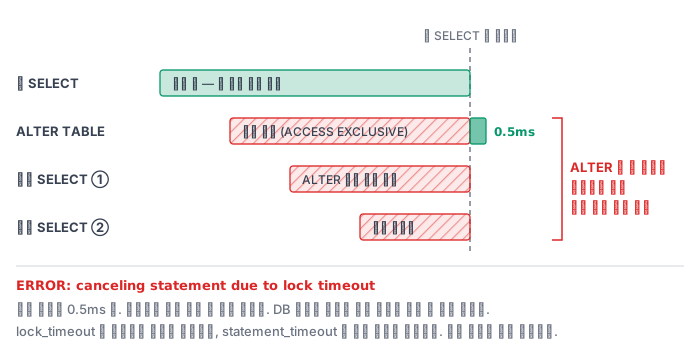
It looks as if the entire service has stopped. Yet the DB metrics look fine — CPU and disk are idle and every individual query is fast. That is why finding the cause takes so long.
So there is one rule
set lock_timeout = '3s';
alter table ...;
Always set lock_timeout before a migration. If you cannot get the lock within 3 seconds, give up and try again later. A failed migration can simply be run again, but the 5 minutes you made everyone queue cannot be taken back.
Do not confuse it with statement_timeout. That limits execution time, while lock_timeout limits waiting time. A migration needs the latter.
Indexes block writes
CREATE INDEX takes a SHARE lock, which conflicts with INSERT, UPDATE, and DELETE. Reads work, but writes are blocked. On a large table, that can last for minutes.
create index concurrently idx_n on big(n);
CONCURRENTLY scans the table twice and does not block writes. In return, you have to accept three things.
- It is slower — it scans twice
- It cannot be used inside a transaction — it fails if your migration tool automatically wraps statements in a transaction
- If it fails, an unusable index is left behind —
indisvalid = false. You have to drop it and create it again
If you do not know about point 3, you can spend a long time puzzling over "I created the index but it is not being used." Check like this.
select indexrelid::regclass, indisvalid from pg_index where not indisvalid;
Dropping a column is risky too
drop column itself is fast (it only changes metadata). The problem is when code that still reads that column is running.
So split the order.
- Deployment A — make the code stop using that column
- Deployment B — drop the column
If you put both in the same deployment, errors occur for a few seconds in between. Adding a column works the same way — create the column first, and use it in the next deployment.
Backfill in batches
update big set note = 'x'; -- 30만 행을 한 트랜잭션에
This locks all of those rows, inflates the WAL all at once, and makes replication lag spike.
update big set note = 'x' where id between 1 and 10000;
-- 커밋하고, 잠깐 쉬고, 다음 구간
If you commit in batches, locks stay short and replication keeps up. It looks slow, but the service does not stop.
Summary
| Operation | Lock | Risk |
|---|---|---|
add column (with a default) |
ACCESS EXCLUSIVE | The operation is fast, the wait is the danger |
create index |
SHARE | Writes are blocked |
create index concurrently |
Weak | Slow and not allowed in a transaction |
set not null |
ACCESS EXCLUSIVE | Full scan |
Bulk update |
Many row locks | WAL and replication lag |
In every case, setting lock_timeout avoids the worst outcome.
In the field
This kind of failure stands out because it happens inside a deployment window. The person who ran the migration sees only that the command does not finish, while everyone else sees the service stopped entirely. Meanwhile the database metrics are all green, so minutes slip by before anyone finds the cause.
Three things are worth agreeing on as a team. First, always set lock_timeout on a migration session — failing is better than stopping everything. Second, before running, check whether a long-running transaction exists on that table. Third, write down how to undo it first — adding a column is easy, but a type change is hard to reverse.
If you use a migration tool, also check whether it wraps statements in a transaction. If it does, CREATE INDEX CONCURRENTLY will not run inside it, so you have to pull that one statement out and run it separately.