
The Partition Key Decides Every Query That Follows
One-line summary
What you choose as the partition key decides the cost of every query from now on, the more finely you split the more small files pile up, and the price of undoing a wrong choice is the cost of rewriting everything.
Why this was needed
You inserted the same rows, yet one query finishes in 0.2 seconds and another takes 40 seconds. The query is identical and the data is identical. The one thing that differs is how the files are laid out on disk.
Partitioning means dividing directories by value. If only that day's data is under day=2026-01-03/, a query that looks only at that day does not even open the other directories. A file you do not open costs 0. This is almost the only benefit partitioning gives, and a very large one.
The problem is that the benefit arises only for conditions on the key. If you filter by a field that is not in the directory name, there is nothing to cut away, so you have to open everything. So choosing a key is not about the nature of the data but about choosing the shape of the queries that will come in the future.
How it works
"Then let's just put every frequently used field in as a key" is the first trap. If you take date, region, and inflow path all as keys, the number of partitions becomes the product of the three values. Data of 300 rows a day is suddenly scattered across 160 directories, and each file has two or three lines.
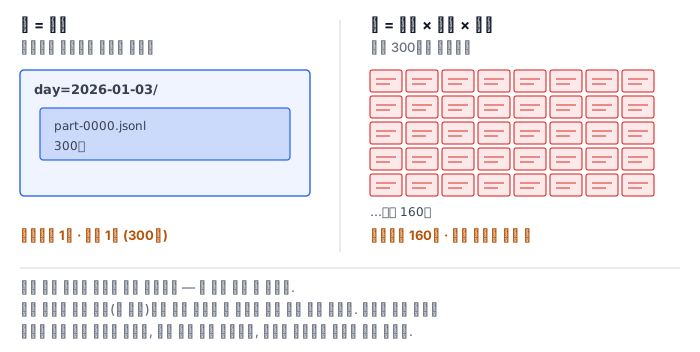
This is the small file problem. The loss occurs in three places. The fixed cost of opening one file becomes greater than the cost of reading its contents, the number of entries on the side that manages the listing (whether a manifest or a metastore) explodes, and compression and encoding do not work properly.
Looking at how a single file fits with the read unit makes it clear why small files are a loss. Parquet's concepts documentation defines a row group as "a logical partitioning of the data into rows" and a column chunk as "a chunk of the data for a particular column, lying in a particular row group and guaranteed to be contiguous in the file." The word contiguous is the key — it means you can fetch it with one large sequential read. A page is the unit below that and "an indivisible unit in terms of compression and encoding."
The Parquet configuration documentation recommends setting row groups large, at 512MB to 1GB. This is to get large sequential I/O and large column chunks, and it cites as the ideal layout having one row group fit in one block. It recommends 8KB for pages, because the smaller they are, the easier it is to find and read a single row.
The conclusion follows from here. If the file is much smaller than the row group, that structure does nothing. You cannot fit a 512MB row group into a 2KB file. The reader just repeats reading the metadata at the tail of every file and opening it. So file size is not a matter of taste but the fit with the read unit.
This lab does not use Parquet. The lab image has no pyarrow and the Pod cannot install at runtime. So we build the same structure by hand with partition directories, a manifest, and JSON Lines. Only the name row group is missing; the story that a single file fits with the read unit remains the same.
Compaction and the reader in the middle of it
When small files pile up, you run compaction. It is the job of concatenating the small files within one partition to be close to the target size and turning them into a big file. It is not hard. What is hard is what a reader sees in the middle of compaction.
While the new file is being written, the old files are still there. A reader that collects files by scanning the directory at this time picks up both old and new files and counts the same lines twice. This is where the incident of a total becoming exactly double comes from.
There is one way to prevent it. The reader looks at the listing (the manifest), not the directory. Compaction swaps the listing in a single step after it finishes writing the new files, and only then deletes the old files. If the listing swap is atomic, the reader sees either the whole old listing or the whole new listing. There is no in-between.
There is a rule for the new file names too. They must not overlap with the old names. If they overlap, you overwrite the file you are reading and that partition becomes entirely empty.
What it looks like in the field
First, the price of changing the key is rewriting everything. The partition key is the directory structure itself, so to change it you must read every row and write every file anew. So the meeting to choose the key is worth having one more time.
Second, a time key almost always goes in. This is because most queries come in by period, and deleting old data wholesale is also done per directory.
Third, do not use a field with many values as a key. If you take a user ID or an order number as the key, partitions are created as many as there are rows. This mistake has no symptoms when the data is small and shows up months later.
Fourth, the average file size lies. If one big file and hundreds of small files are mixed, the average looks fine. You must look at the median and the number of files below a threshold together to see the real shape.
What really matters in practice
- Choose the key from the shape of the queries. Do not choose it from the data's field list.
- Every time you add a key, the partition count multiplies. With three, the product is taken three times.
- Look at the median and the small-file count, not the average.
- The reader looks at the listing. A reader that scans the directory sees double in the middle of compaction.
- When compacting, keep the new names from overlapping the old names.
What to do in the next lab
You create the raw orders and build up the tool pq.py step by step. You build a lake split by date alone and a lake split finely by date, region, and path, compare their file counts and size distributions, and measure how the number of files opened differs between a condition on the partition key and a condition not on it. Then you run compaction, kill it in the middle, and check what a reader using the manifest and a reader scanning the directory each see. Finally, you change the key, rewrite, and write down the cost. The grader actually runs your tool each time with a different raw data and target size and compares the answers.