
ClickHouse — A Columnar Analytics Database from the Inside
The sparse primary key — what key order lets you skip
In one line
MergeTree's primary index records not one entry per row but one key value per granule (8192 rows by default), that of the first row. So all the index can do is tell "this granule cannot contain the value you are looking for", and how much it can rule out is decided by the column order of the sorting key and the cardinality of the earlier columns (the number of distinct values).
Why this was needed
The B-tree of a row-oriented database points to each and every row. With billions of rows the index does not fit in memory, and since analytic queries scan millions of rows anyway, the ability to pinpoint a single row is of little use. ClickHouse went the opposite way. It lays out the rows on disk in sorting-key order and records only the first key value of each block of 8192 rows. The index of a 2-million-row table is 245 key values — a few hundred bytes as a compressed file — so it can always be kept in memory.
The price is precision. Because the unit the index selects is the granule, even if you are looking for one row, you read 8192 rows. And since the index is the sort order itself, a table has only one sort order. Some queries get faster and some get no help at all. This module covers how to separate that "some" with numbers. It goes one step deeper into what the previous module showed, "skipping happens only when filtering by the sorting key", and looks at what happens when you filter by the second key column.
How it works
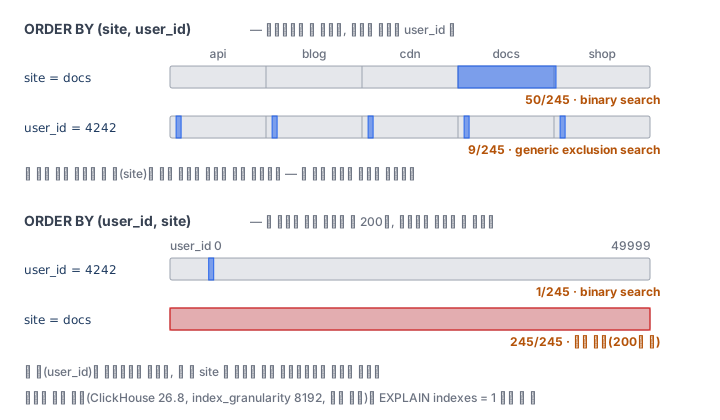
A table with ORDER BY (site, user_id) sorts by site first and, within the same site, sorts by user_id. If there are five sites, five site lumps sit on disk one after another. If you attach EXPLAIN indexes = 1 to this, the PrimaryKey step tells you how many granules it chose.
PrimaryKey
  Keys: site
  Condition: (site in ['docs.example', 'docs.example'])
  Parts: 1/1
  Granules: 50/245
  Search Algorithm: binary search
Filtering by the first key column is a binary search. The index is sorted by the first column, so it can immediately find the mark where docs starts and the mark where it ends. If you filter only by the second column, user_id, the story changes. user_id starts again from 0 in each site lump, so as a whole it is not sorted. Here ClickHouse uses generic exclusion search. It looks at the key values of two neighboring marks, and if the earlier column's value does not change between them, the range of the later column is fixed, so it can decide "4242 is not in this interval". An interval where the earlier column changes cannot be decided, so it is kept. This is the conclusion of the official guide — the algorithm is effective when the cardinality of the earlier key columns is low. In the lab Pod, user_id = 4242 chose 9 out of 245.
In the ORDER BY (user_id, site) table, which reverses the key order, the result is reversed too. user_id is now the first column, so it finishes with 1 granule. But filtering by site gives 245/245 — it reads everything. 50,000 users are spread over 245 granules, so about 200 users sit in one granule, and between neighboring marks the earlier column user_id almost always changes, so it cannot rule out any interval. If the cardinality of the earlier column is high, the later column is useless as an index.
Granule size is a knob too. If you create the table with the table setting index_granularity = 1024, marks grow from 246 to 1955, and the rows read while looking for user_id = 4242 dropped from 73,728 to 9,216. In exchange, the index file (primary_key_size in system.parts) gets bigger. Since the design keeps the index in memory, the finer you cut the granules, the more memory you use.
Finally, PRIMARY KEY and ORDER BY can differ. You can sort by (site, user_id, ts) but have only (site, user_id) written into the index. The rule in the MergeTree documentation is one thing — the primary key must be a prefix of the sorting key. If you write something that is not a prefix, the table is not created ("Primary key must be a prefix of the sorting key"). When I compared two tables with the same sorting in the lab Pod, the primary key file shrank from 1,620 bytes to 647 bytes. Trailing columns you do not filter by can take part only in sorting and not go into the index.
One pitfall. In 26.8 the query condition cache is on by default, so when you run the same WHERE a second time, it skips "granules that had no matching rows last time". The user_id = 4242 query read 73,728 rows the first time and 40,960 the second. To measure the index's ability, give --use_query_condition_cache 0 and measure.
What it looks like in the field
I often get the question "I sorted by id, so why is the per-site report slow?" The answer is usually the key order. Put the columns that almost always appear in the query's WHERE, and among them the one with few distinct values first, and put the time column you often cut by range after that. For a one-day site report, (site, ts) cuts the rows read to a fraction compared with (site, user_id) — this is the last step of this module's lab.
The second most common is lining up columns with many distinct values in the key first, in order to make "every query fast". The later a column is, the more the earlier columns must stay at the same value between neighboring marks for it to be of use — the generic exclusion search rule above stacks up column by column. Drop trailing columns you do not filter by from the index to shrink the PRIMARY KEY to a prefix, and for queries that truly need another sort order, solve it with projections or materialized views in a later module.
The official documentation (Choosing a primary key) says the sorting key must be decided when the table is created and cannot be added to later. To change the sort order you have to create a new table and move the data, so the cheapest thing is to look at the EXPLAIN of a few representative queries when you first create it.
What you will do in the next lab
You create sparse.hits with (site, user_id), insert 2 million rows and merge the parts into one. You save the EXPLAIN when filtering by site and when filtering by user_id alone, copy out the granules chosen and the search method, and measure the rows_read of the two queries on a table with the key order reversed. After comparing the mark count of a table with granules cut to 1024 rows and the index size of a table with the PRIMARY KEY set separately, you choose the sorting key that fits a one-day site report query and cut the rows read to a quarter or less.