
ClickHouse — A Columnar Analytics Database from the Inside
Incremental materialized views — an INSERT trigger, not a stored query
In one line
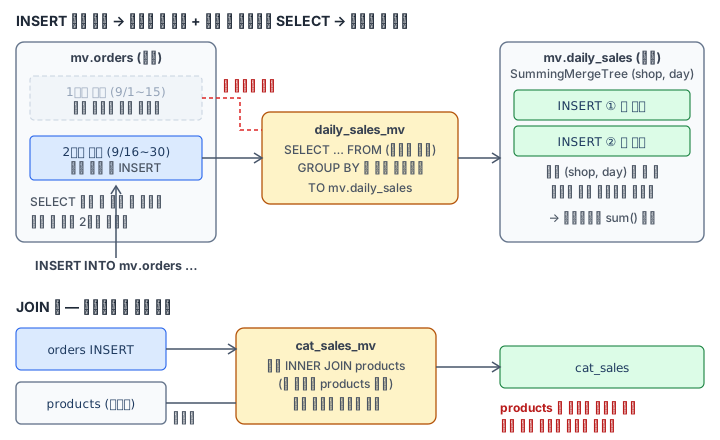
A ClickHouse (incremental) materialized view is not a snapshot that stores a result but a trigger that, every time an INSERT comes into the source table, runs the SELECT only on the incoming block and appends the result to the target table. The view cannot see rows from before it existed, changes to the right-hand join table, or UPDATEs and DELETEs on the source.
Why this was needed
In the previous module we saw that SummingMergeTree and AggregatingMergeTree combine rows at merge time. But if a dashboard asks every second for "daily sales per store" over a source log that piles up every day, re-aggregating hundreds of millions of source rows every time is a waste. You want to move the computation from query time to insert time — this is exactly the sentence the official documentation gives as the motivation for materialized views.
A PostgreSQL materialized view is a snapshot that reruns the whole query when you issue REFRESH MATERIALIZED VIEW. ClickHouse chose another way. Even if the source is billions of rows, so that the cost is proportional only to "the size of the newly arrived block", it made the view a trigger hooked on the INSERT path. The price is clear. The view knows only the blocks it has seen. If you use it without knowing that limit, the numbers go wrong silently.
How it works
CREATE MATERIALIZED VIEW mv.daily_sales_mv TO mv.daily_sales AS
SELECT toDate(ts) AS day, shop, count() AS orders, sum(qty * price) AS revenue
FROM mv.orders GROUP BY day, shop;
TO is the table to send the result to. The CREATE VIEW documentation describes the behavior in one sentence — when you INSERT into the source table, a part of the inserted data is transformed by this SELECT and goes into the view. And even if there is a GROUP BY, it aggregates only within the one inserted block and does not combine any further. In this lab Pod, when I inserted 200,000 rows with one INSERT, the target table got (8 shops × 15 days) = 120 rows. If you insert several times, the same (shop, day) becomes several lines — in measurement there were 720 rows for 240 keys. So make the target table an engine that combines the same keys at merge time (SummingMergeTree or AggregatingMergeTree), align the sorting key with the view's GROUP BY, and always add again with sum() in queries as well. Because when merging will happen is not fixed.
Three things in a view's life that are easy to miss:
| Situation | What the view does |
|---|---|
| Rows that were in the source before the view was created | Nothing — the target table starts at 0 rows |
| ALTER UPDATE, DELETE and DROP PARTITION on the source | It does not fix the target table |
| Rows added to the right-hand table of a JOIN | The view does not run — the trigger is only the leftmost table |
Filling in the first row is called backfill. There are two ways. Create it with POPULATE attached, or after creating the view, directly run INSERT INTO 대상 SELECT ... FROM 원천 WHERE (뷰가 못 본 구간) with the same SELECT (here the Korean words stand for "target", "source" and "the range the view did not see"). According to the 26.8 documentation, POPULATE on an ordinary CREATE now takes a brief exclusive lock on the source so that concurrent INSERTs are passed over exactly once (the setting materialized_views_populate_atomically, default 1 — confirmed in the Pod). Still, pitfalls remain — if the TO table already has rows, the backfilled rows are appended; if you rerun a failed CREATE, the rows already inserted go in again; and with CREATE OR REPLACE and in Replicated databases it is the old non-atomic way or is blocked altogether. So in the field people usually decide a range and INSERT directly. The key is "do not insert again a range the view has already seen".
For values that cannot be added, store the intermediate state instead of the result. If you add up the distinct user counts counted per day, people who came on several days get counted twice. If you store the state in an AggregateFunction(uniqExact, UInt32) column with uniqExactState(user_id) and merge with uniqExactMerge at query time, it equals recounting the source.
Chaining works too. The target table is also a table, so if an INSERT goes into it, a view that has that table as its source runs again. To avoid storing the raw data, you make the source ENGINE = Null; a Null table stores nothing but wakes the views — a table used only as an entrance.
JOIN is separately warned about by the official documentation. The leftmost table is replaced by the inserted block and the right-hand table is read whole. So if an order arrives before the product, INNER JOIN drops that order, and even if the product arrives later, it does not bring it back. If there are several views on one source, by default (parallel_view_processing = 0) they run one at a time in the order of the views' uuids.
There is also a refreshable view (REFRESH EVERY 1 HOUR) that periodically reruns the whole query. It has no INSERT trigger and has no restrictions on JOIN and UNION, but the result is as stale as the last refresh. Since the result depends on the time, it is not covered in this lab.
What it looks like in the field
The most common incident is "we deployed the view, but last month's numbers on the dashboard are empty". The view sees only INSERTs from the moment of deployment, so the backfill was missed. The second incident is backfilling in a hurry and inserting even the range after deployment, so the last few days double. When you backfill, decide a boundary time and insert only what is before it.
The third is joining a dimension table. You built a view that attaches the product category to orders, and orders for new products vanish from the category aggregation. They are quietly left out on every day that the product master syncs later than the orders. The paths the documentation recommends are to defer the join to query time, or to use a dictionary or a refreshable view.
The fourth is code that reads the target table without adding, like SELECT orders FROM daily_sales WHERE .... It is right on days when merging is done, and on days when an INSERT has just come in, two rows come out and it is wrong — it becomes a bug you cannot reproduce.
What you will do in the next lab
You insert the first batch of 200,000 orders into mv.orders and create a SummingMergeTree target and a view. You insert the second batch and record the difference between the source and the target, and backfill only the first batch to make the two tables match. You write a query that reads the target table with sum, and put a distinct-buyer state into an AggregatingMergeTree. You stream only paid orders through a Null table to confirm chaining, and finally count how many orders a JOIN view loses when the product table is filled late.