
ClickHouse — A Columnar Analytics Database from the Inside
Mutations, lightweight DELETE and TTL — changing immutable parts
In one line
A MergeTree part does not change once written. So UPDATE and DELETE become asynchronous jobs (mutations) that rewrite whole parts, a lightweight DELETE writes only a mark that hides the rows to delete and defers the actual removal to merges, and TTL is a rule that drops or summarizes expired rows and values when a merge happens. For all three, you have to know that it is not "just this row, right now".
Why this was needed
In the earlier modules we saw that the design in which parts are immutable makes writing and compression fast. The price is modification. Requests to delete personal data, corrections of wrongly entered status values and cleanup of old logs come to every analytics database. You cannot change a few bytes in place as in a row-oriented database, so ClickHouse divided this demand among three tools — mutations for rare, heavy corrections, lightweight DELETE for frequent deletion, and TTL for lifetime management expressed as rules. The goal of this module is to see in numbers why "Avoid mutations" in the official documentation says avoid the first tool where possible.
How it works
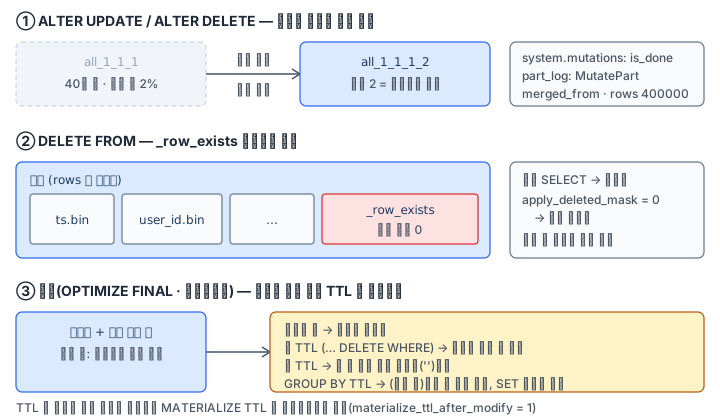
Mutations. ALTER TABLE t UPDATE ... WHERE ... and ALTER TABLE t DELETE WHERE ... are heavy commands that the documentation deliberately made start with ALTER. When you submit one, a line appears in system.mutations, and in the background it rewrites the parts holding the relevant rows and swaps them in atomically. The default is asynchronous, and giving mutations_sync = 2 waits until it finishes. On this Pod, when I changed the status of 2% (about 8 thousand rows) of a 400,000-row part, the part name changed from all_1_1_1 to all_1_1_1_2, and the MutatePart record in system.part_log read 400,000 rows and wrote 400,000 rows. The 2 at the end of the name is that mutation's number. A few properties the documentation states — mutations are applied in submission order and apply only to data that came in before submission, they cannot be undone, and they continue after a server restart. Sorting-key and partition-key columns cannot be UPDATEd.
A failed mutation is scarier. When I submitted a mutation that converts a string email with toUInt32, system.mutations was left with is_done = 0 and latest_fail_error_code_name = CANNOT_PARSE_TEXT and it did not stop by itself. A perfectly good UPDATE submitted afterward with mutations_sync = 2 was also blocked by the earlier one and came back with an UNFINISHED error. The only way to end it is KILL MUTATION.
Lightweight DELETE. DELETE FROM t WHERE ... internally becomes an UPDATE _row_exists = 0 WHERE ... mutation (visible as is in the command of system.mutations). For a Wide part, it writes only the one hidden column _row_exists and reuses the other column files via hard links. After that, SELECT applies this mask as a PREWHERE. On this Pod, right after deleting the 22 rows of user 888, an ordinary SELECT gave 0 rows, SETTINGS apply_deleted_mask = 0 gave 22 rows, and the rows in system.parts stayed as they were. The rows were actually removed after merging with OPTIMIZE ... FINAL. The documentation also says "they are physically deleted at the next merge". We saw in the earlier module that on a table with a projection it is rejected by default.
TTL. TTL is a rule attached to a table or column, and it is applied at merge time. If there are no merges, it tries a TTL merge every merge_with_ttl_timeout of the documentation (default 4 hours). It has three uses.
| Form | Example | When the deadline passes |
|---|---|---|
| Column TTL | email String TTL event_date + INTERVAL 90 DAY |
That column's value becomes the type's default ('') |
| Row TTL + WHERE | TTL event_date + INTERVAL 180 DAY DELETE WHERE status = 'test' |
Rows matching the condition are deleted |
| GROUP BY summary | TTL ts + INTERVAL 30 DAY GROUP BY user_id, toStartOfDay(ts) SET ... |
Several rows are rolled into one line |
MODIFY TTL, or MODIFY COLUMN with a TTL attached, by default (materialize_ttl_after_modify = 1) also creates a MATERIALIZE TTL mutation that applies to existing parts — that is, changing a TTL is also a job that rewrites parts. The grouping columns of a GROUP BY summary must be a prefix of the primary key. On this Pod, the 200,000 rows of lookup records from March 2024 were still 200,000 rows right after the INSERT, and after OPTIMIZE FINAL they shrank to 15,500 rows of (user, date).
Note too that because a TTL expression is based on now(), the result changes with time. This lab puts all the data in 2024 and gives legal-hold rows a far-future date with if(legal_hold = 1, toDate('2100-01-01'), ...), so that the same rows get the same verdict regardless of the grading time.
What it looks like in the field
A design like "GDPR deletion requests are hundreds a day and we run an ALTER DELETE for each one" soon piles up a mutation queue. All of a table's mutations run in turn, and if one stops in failure, everything behind it is blocked. If deletions are frequent, first consider lightweight DELETE, ReplacingMergeTree deletion markers, or DROP per partition.
The second is the misunderstanding "we did a lightweight DELETE, so the disk must be freed". Only a mask was written, so the space returns only after merging. If you legally have to promise "physically deleted by when", use min_age_to_force_merge_seconds or ALTER DELETE as the documentation recommends.
The third is the report that TTL "is not taking effect". TTL applies only at merges, so on a quiet table it can be hours late. To check, apply it right away with MATERIALIZE TTL, and in normal operation the documentation's recommendation is to split partitions by the same time unit as the TTL so that they drop off whole.
What you will do in the next lab
You make the 400,000 rows of mut.events one part, then confirm with part_log that ALTER UPDATE rewrites the whole part. You delete user 777 with ALTER DELETE and 888 with a lightweight DELETE, and count the difference between the mask and physical deletion. You apply a TTL on the email column and a TTL on test rows, summarize the lookup records with a GROUP BY TTL, and finally record a mutation that failed and stopped, and KILL it.