
ClickHouse — A Columnar Analytics Database from the Inside
SummingMergeTree and AggregatingMergeTree — Merges Carry the Aggregation Forward
In one line
Both engines fold rows with the same sorting key into one at merge time while combining their values. For values that can be reduced by summing (counts, totals), SummingMergeTree simply adds them, and for values that cannot be reduced by summing (distinct user counts, averages), AggregatingMergeTree carries not a number but the intermediate state of the aggregation. You cannot know when merges will finish, so queries always finish with GROUP BY and sum() or -Merge.
Why this was needed
Say a dashboard shows "daily visits per site". If the source events are hundreds of millions of rows a day, scanning all the source every time the screen opens is a waste, when the answer is only a few hundred rows a day. So you summarize in advance. The problem is that data keeps coming in. You put in this morning's summary, and when the afternoon's data arrives, you have to find the summary row and fix it — but as we saw in the earlier modules, MergeTree parts are not modified.
If ReplacingMergeTree was "append a new version and discard the old ones at merge time", these two engines are "append a new piece and add them up at merge time". If you just insert the afternoon's summary as one more line, the rows with the same key are combined into one by a merge. Writes are still only appends.
How it works
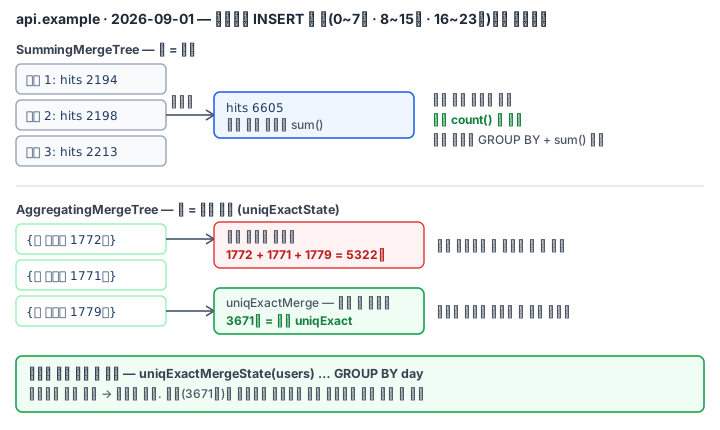
SummingMergeTree — the rule in the reference documentation is short. Rows with the same sorting key are replaced by one row in which the values of the numeric columns are added. If you do not write the columns to add as an engine argument, it adds all numeric columns not in the sorting key. Rows in which all the columns to add became 0 are deleted. For columns that are not added, any one of the existing values remains.
This "all numeric columns" is the trap. On the lab server, when I inserted (1, 5, 10) and (1, −5, 20) separately into a (k, a Int32, mx UInt32) table and merged them, it became (1, 0, 30). The mx I had put in as a maximum was added and became 30, and even though a became 0, the row remained because mx was not 0. If you need a maximum, use a SimpleAggregateFunction(max, UInt32) column of AggregatingMergeTree (the same two rows were combined into 20).
If you insert the lab data (1 million rows, 5 sites × 30 days = 150 keys) in three batches by time of day and stop merges, the summary table is 450 rows. This state is why the documentation says to "use sum() and GROUP BY in queries, since summation may not be complete". SELECT * returns three rows per key, and adding again with GROUP BY site, day gives exactly the same result as the original regardless of whether merging has happened.
AggregatingMergeTree — distinct user counts cannot be added. Because among the 1,772 who came in the morning and the 1,771 who came in the afternoon, there are the same people. So you store a state instead of a number. In the words of the combinator documentation, -State returns not the result value but "the intermediate state of the aggregation (a hash table, for uniq)", and -Merge merges the states and produces the result value.
users AggregateFunction(uniqExact, UInt64)      -- 열 타입: 어떤 함수의 상태인가
INSERT ... SELECT uniqExactState(user_id) ...    -- 넣을 때 -State
SELECT uniqExactMerge(users) ... GROUP BY ...    -- 읽을 때 -Merge
-If attaches a condition (the type of countIfState(is_bot = 0) was AggregateFunction(countIf, UInt8)). Keep the average as a state too — avgState holds the sum and the count, so merging and then dividing gives exactly the original average. A state is not a value people read, so if you pull it out as JSON, binary bytes are printed.
The biggest advantage is that states can be merged again. -MergeState merges states and returns a state again, not a result value. You can fold per-site daily states into per-date states, and get "daily visitors across sites", which would be impossible if you had kept only numbers, without the original.
What it looks like in the field
The most common bug is adding up numbers that were finished per row. In the lab, finishing each of the 450 state rows before the merge with finalizeAggregation and adding gave 807,524, while merging per key and then finishing and adding gave 552,634. If "daily users total" on a dashboard is strangely large, suspect this mistake. The same goes for averages — an average of averages is not an average.
The second is numeric columns that must not be summarized (maximums, identifiers, ratios) getting mixed into a SummingMergeTree. The documentation recommends keeping the whole source in a MergeTree and using SummingMergeTree only for summaries. It is so that even if you choose the sorting key wrongly, you can rebuild it from the source.
The third is who fills this table. In the lab you run INSERT ... SELECT three times by hand, but in the field you pair it with a materialized view that automatically puts in the summary whenever an INSERT comes into the source. That is the next module. One more thing — if the same key appears several times inside one INSERT, it is combined at the moment of insertion (optimize_on_insert). When I inserted 1 million rows with hits = 1 in one go, it immediately became 150 rows.
What you will do in the next lab
You insert 1 million rows into the source agg.hits, insert the (site, day) summary into a SummingMergeTree in three batches by time of day, and confirm the row count before merging. You check that a GROUP BY + sum() query is the same as the original even before merging, and then merge it yourself. Then you put distinct user counts, averages and views counting only humans into an AggregatingMergeTree with -State and finish them with -Merge, and record how wrong the values finished per row and added are. Finally you merge the daily states again per date with -MergeState.