
CKAD — Kubernetes Application Developer
Deployment Is Not Changing — It Is Changing Reversibly
In one line
Deployment, Helm, and Kustomize all solve the same problem: not killing the service while you change it, and being able to go back to the previous state when something goes wrong. That is why all three tools have the concept of a "revision."
Why this was needed
If you run Pods you created directly, changing the image causes downtime, because nobody is serving between deleting and recreating. A ReplicaSet maintains the count, but it has no concept of "changing the image."
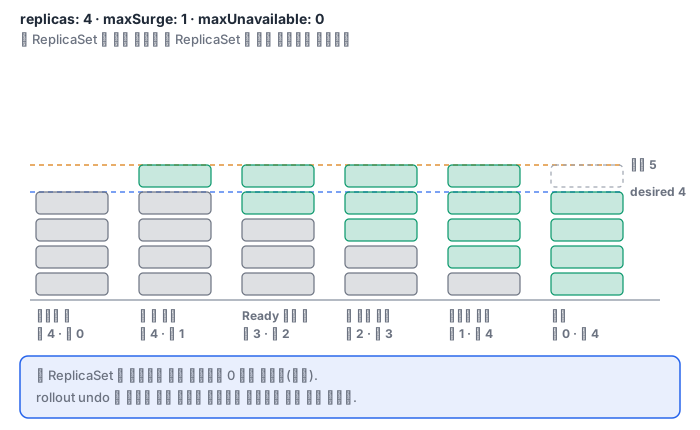
A Deployment adds one more layer on top. A Deployment manages several ReplicaSets. When you change the image, it creates a new ReplicaSet and scales the new one up while scaling the old one down. The old ReplicaSet remains with 0 replicas, so when a command to roll back arrives, it only has to reverse the direction. This is why rollout undo is fast — there is no need to pull the image again.
Two numbers control the speed. maxSurge is how far above desired the count may go, and maxUnavailable is how far below desired it may fall. With maxUnavailable: 0, the original count is always alive, but it waits until the new Pod becomes Ready, so the rollout is slower. Here, without a Readiness Probe, all of this safety net is neutralized. With no probe, a container is considered Ready the moment it starts, and traffic goes to a Pod that is still initializing.
How it works
Here are the deployment strategies in a table.
| Strategy | Implementation | Rollback speed | Resources |
|---|---|---|---|
| Rolling update | One Deployment, maxSurge/maxUnavailable |
Medium (roll again) | +maxSurge |
| Blue-green | Two Deployments + Service selector switch | Immediate (switch the selector back) | 2x |
| Canary | Two Deployments + the same Service selector, replica ratio | Immediate (canary 0) | A little more |
Blue-green is a label game. checkout-blue carries the label version: blue and checkout-green carries version: green, and when you put version: green in the Service's selector, all the traffic moves over at that moment. A canary is the opposite: keep the selector narrow, using only the shared label, so that the Pods of both Deployments join the endpoints, and build the traffic ratio from the ratio of replica counts. At 9:1, that is roughly 10%.
The CHANGE-CAUSE you see in kubectl rollout history is not magic; it is the kubernetes.io/change-cause annotation. The old --record flag has been deprecated, so you attach it yourself with kubectl annotate deployment web kubernetes.io/change-cause="...". Without it, rollout history lists only revision numbers and you cannot tell what changed.
Helm raises the same idea to the package level. Each revision of a release is stored as a Secret in the namespace (sh.helm.release.v1.<이름>.v<번호>, where the placeholders are the release name and the revision number), and the rendered manifest and the values are stored in it in full. helm rollback creates a new revision with that revision's chart and values — it does not rewind time; it moves forward while reapplying the old contents. helm upgrade does a 3-way merge. It compares three things — the previous revision's manifest, the newly rendered manifest, and the current actual state of the cluster — and applies only the necessary changes. That is why it does not recklessly revert parts that another tool touched.
Kustomize does the same job without templates. You put the shared manifests in base and layer namePrefix, labels, and patches in overlays/<환경> (the placeholder is the environment name). Because it understands and merges the YAML structure instead of substituting strings, it has the advantage that the result is always valid YAML. You view only the rendered result with kubectl kustomize <경로> and apply with kubectl apply -k <경로> (the placeholder is the path).
What it looks like in the field
This happened when I was installing the GPU Operator on my homelab cluster. I first installed it with toolkit.enabled=false, which was a misjudgment, and to fix it I had to change just that one value.
helm upgrade gpu-operator nvidia/gpu-operator --version v26.3.3 \
  -n gpu-operator --reuse-values --set toolkit.enabled=true
Without --reuse-values, all the values of the previous revision would have been discarded and reset to the chart defaults. Then driver.enabled=false would have gone back to the default true, the Operator would have tried to install the driver again, and it would have clashed with the host that already had 570.195.03 installed, and the node would have lost its GPU. One flag prevented the incident.
After the upgrade, the history looked like this.
REVISION  STATUS      CHART                 DESCRIPTION
1         superseded  gpu-operator-v26.3.3  Install complete
2         deployed    gpu-operator-v26.3.3  Upgrade complete
The key point is that revision 1 was not erased and remains as superseded. It means the state could be rolled back with helm rollback gpu-operator 1.
Another thing to notice is that Helm did not create the DaemonSet directly. All Helm did was change toolkit.enabled of the ClusterPolicy custom resource from false to true, and the Operator controller that detected that change created the DaemonSet. Helm declares, and the controller assembles. It is a scene that shows where the boundary of a deployment tool's responsibility lies.
What you will do in the next lab
In the ckad-deploy namespace, you tune the rolling update parameters, push the image twice, roll back to a specific revision with --to-revision, and build blue-green and canary yourself with labels and replica ratios. Next, you create a local chart with helm create, edit its values, run helm template/install/upgrade, then create a Kustomize base and overlay and apply them with kubectl kustomize and apply -k. This environment has no internet access, so helm repo add cannot be used; you must use local paths only.