
CKA — Kubernetes Administrator
Who Creates the Pod, and Who Picks the Node
Summary
A Deployment does not create Pods. It creates a ReplicaSet, the ReplicaSet creates Pods, the scheduler picks a node, and the kubelet runs them. Each layer looks only at the one layer below it. If you know this chain, you can diagnose rollout and scheduling problems layer by layer.
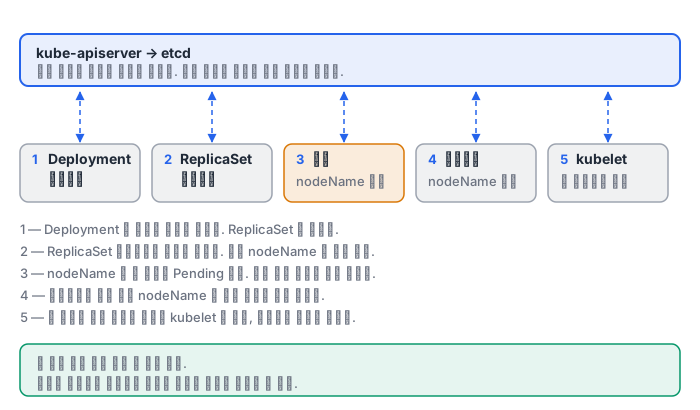
Why this matters
Why doesn't a Deployment create Pods directly? Because of rolling updates.
When you change the image, the Deployment creates one more new ReplicaSet. Then it scales the new one up while scaling the old one down. How fast it scales up and down is governed by maxSurge and maxUnavailable.
| Parameter | Meaning | When replicas=4 |
|---|---|---|
maxSurge: 2 |
How many more than the target can be started | Up to 6 during the roll |
maxUnavailable: 0 |
How many fewer than the target are allowed | 4 are always Ready |
If you set both to 0, nothing can move. maxUnavailable: 0 means zero downtime but needs spare resources, and maxSurge: 0 saves resources at the cost of a brief drop in capacity.
This is also why rolling back is possible. The old ReplicaSets are not deleted but remain with 0 replicas, up to revisionHistoryLimit of them. rollout undo just scales that old ReplicaSet back up. If you set this value to 0, you cannot roll back.
How it works
There are seven main handles for telling the scheduler where to place a Pod.
- nodeSelector — exact label match. The simplest and the most commonly used.
- nodeAffinity required — selects nodes with expressions (In, NotIn, Exists, Gt, Lt). If it cannot be satisfied, the Pod stays Pending.
- nodeAffinity preferred — with a weight, it only adds bonus points in the score phase. The Pod is still placed even if it cannot be satisfied.
- podAntiAffinity — avoids a node if a Pod with the same label is already within the same topologyKey. The basis of high-availability placement.
- taint / toleration — a refusal the node sets, and a pass the Pod presents.
NoScheduleblocks only new Pods, whileNoExecutealso evicts Pods that are already running. - PriorityClass — who goes first when resources run short. A higher-priority Pod can preempt a lower one.
- topologySpreadConstraints — keeps the difference in Pod counts per zone or node at or below
maxSkew.
A part that people often get wrong: the set of candidate domains for topologySpread is the nodes that pass the Pod's nodeAffinity/nodeSelector. Taints, on the other hand, are ignored by default when counting. So a cordoned or tainted node remains a domain with 0 Pods, which widens the skew, and with DoNotSchedule the rest can end up Pending.
What it looks like in the field
Case 1 — Pending may not be an error. Right after rebuilding a homelab with kubeadm 1.34 + Cilium, hubble-relay and hubble-ui stayed Pending on the single node.
Warning FailedScheduling 0/1 nodes are available: 1 node(s) had untolerated taint(s).
The control plane node carries the node-role.kubernetes.io/control-plane:NoSchedule taint, and the hubble components are Deployments, not DaemonSets, so they do not tolerate it. CoreDNS, on the other hand, has a default toleration and came up fine. Same cluster, same node, different result — the difference was a single toleration. It resolved as soon as a worker joined. This is not a bug but normal behavior.
Case 2 — One GPU is not one GPU. The same homelab has 4 GPUs attached: an RTX 3090 24GB, an RTX 5090 32GB, and two RTX 4070 Laptop 8GB. If a Pod requests only nvidia.com/gpu: 1, a training job that needs 32GB can land on an 8GB laptop GPU. To the scheduler, an extended resource is just a count, and both are equally 1 GPU.
The gpu.memory label that GPU Feature Discovery attaches is a string, so you cannot use a comparison selector such as 24GB or more. So I added labels based on meaning myself.
gpu.homelab/tier=xlarge  gpu.homelab/vram=32g   # 5090
gpu.homelab/tier=large   gpu.homelab/vram=24g   # 3090
gpu.homelab/tier=small   gpu.homelab/vram=8g    # 4070 Laptop x2
Now a workload picks its own weight class with nodeSelector: {gpu.homelab/tier: xlarge}. In the end, scheduling is a matter of how precisely you name your resources.
As another example of choosing placement targets: when I installed the GPU Operator on the same cluster, the NFD worker came up on all 5 nodes, while the other GPU components came up only on the 4 GPU nodes. That is because the other DaemonSets use the labels NFD attached as their nodeSelector.
What to do in the next lab
In the first lab you create a Deployment, scale it, adjust the rolling parameters, and then actually roll out and roll back. You also create a DaemonSet and a StatefulSet. In the second lab you use the seven handles in turn, from nodeSelector to topologySpreadConstraints. The last problem can be solved only if you remember the state of the nodes you cordoned and tainted earlier.