
CKA — Kubernetes Administrator
Volumes Are Divided Into Three Layers
Summary
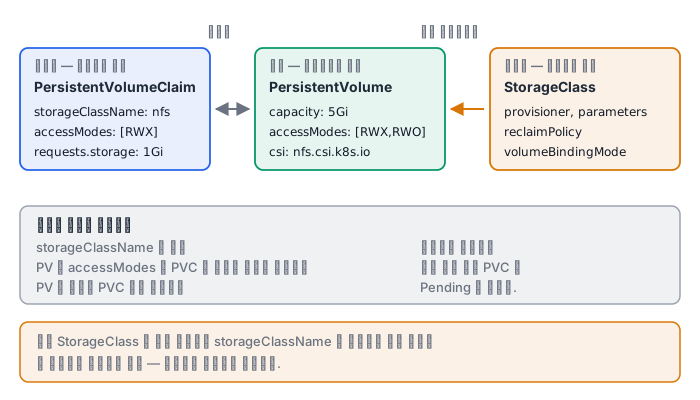
Kubernetes storage has three layers: StorageClass (blueprint) → PersistentVolume (the real thing) → PersistentVolumeClaim (the request form). They are separate because the three represent the concerns of different people, and when they fall out of alignment, a PVC quietly stays Pending.
Why this matters
A developer wants "a 1Gi disk that several nodes can use at the same time." The administrator decides "that will be NFS v4.1 under /volume1/k8s on the NAS, with a hard mount and nconnect 4." If you mix these two concerns in one object, the developer has to know the storage vendor.
So the PVC writes down only the request, the StorageClass defines how to turn that request into the real thing, and the PV represents the real thing. The binding condition is simple. They bind when the storageClassName is the same, the PV's accessModes include what the PVC requires, and the PV capacity is at least the PVC request. If any one is off, it is Pending with no error at all.
The reason CSI appeared is the same desire for separation. In the past, storage plugins lived inside the Kubernetes core code (in-tree), so attaching new storage meant changing Kubernetes itself. CSI broke that coupling, and a driver is split into a controller (a Deployment, for volume create/delete/expand/snapshot) and a node plugin (a DaemonSet, for mount/unmount). The node plugin is a DaemonSet because it must be on every node a Pod can be scheduled to.
How it works
There are three fields in a StorageClass that are hard to undo if you get them wrong.
| Field | Meaning | If you get it wrong |
|---|---|---|
reclaimPolicy |
The fate of the PV after the PVC is deleted | With Delete, the data disappears too |
volumeBindingMode |
When the volume is created | With Immediate, the volume can be created in a different zone from the Pod |
allowVolumeExpansion |
Whether it can be grown later | PVCs from a class created with false can never be expanded |
WaitForFirstConsumer creates the volume after it knows which node the Pod will be scheduled on. It is essential in multi-zone environments.
There are four access modes. RWO (read/write from one node), ROX (read-only from many nodes), RWX (read/write from many nodes), and RWOP (for a single Pod only). Block storage usually goes up to RWO, and RWX is the domain of file storage such as NFS.
On a cluster with a default StorageClass, to not use that class, you must not omit storageClassName but specify it explicitly as an empty string. If you omit it, the default is injected. This distinction appears on the exam too.
What it looks like in the field
Case 1 — Check the mount first. I ran kubectl get sc on a homelab cluster and got No resources found. Without a StorageClass, a PVC stays Pending forever, and you cannot bring up a single stateful workload. I decided to attach a Synology NAS I had at home, and before installing a driver, I checked whether an NFS mount works from a Pod first. The first attempt failed.
mount.nfs: Operation not permitted for 10.0.0.109:/volume1/k8s on /mnt/t
It was rejected even though I had given privileged: true. What was missing was hostNetwork: true. An NFS mount talks to rpcbind and uses a reserved port below 1024 as the source port, and inside a Pod's network namespace this behavior is restricted. Privileged grants capabilities but does not solve a network namespace problem. Because I kept to that order, I could immediately tell that the cause was not the driver.
Case 2 — Split the classes by purpose. After installing csi-driver-nfs 4.13.4, I created two StorageClasses.
nfs-synology(default) —reclaimPolicy: Delete,onDelete: archive,allowVolumeExpansion: true, mount optionsnfsvers=4.1, hard, nconnect=4, noatimenfs-synology-retain—reclaimPolicy: Retain,onDelete: retain
The reason for choosing hard is especially important. On timeout, soft returns an I/O error to the application, and if a database receives an error in the middle of a write, it can lead to silent data corruption. hard retries indefinitely until the server returns, so the data is safe, but when the NAS fails the Pod looks like it simply froze without an error, which makes it hard to find the cause. Every storage setting is a trade-off like this.
I also set the subDir pattern to 네임스페이스-PVC이름-PV이름 (namespace, PVC name, PV name). If you use only the PV name, the NAS file explorer shows only UUIDs such as pvc-da6bb53d-..., so you cannot tell later what is safe to delete.
Case 3 — Capacity is not enforced. I requested 2Gi in the PVC, but NFS has no means of enforcing it. Nothing stops a Pod from writing 100GB. A PVC's capacity is metadata for scheduling and accounting only, and the actual limit has to be enforced by the backend. With block storage, the volume size is the physical limit, so it is enforced naturally, but an NFS subdirectory is not.
I also saw the price of the archive policy in practice. When I opened the NFS export root, there were 32 directories left behind by the previous cluster, with the Prometheus and OpenSearch data still there, using 9.4T of 19.9T. It is safe, but if nobody deletes them, they keep piling up.
What to do in the next lab
You create two StorageClasses to see the difference among the three fields, bind a PV and a PVC statically, create an RWX volume, and watch a StatefulSet's volumeClaimTemplates create PVCs automatically. The last step is how to explicitly reject the default StorageClass.