
Apache Spark — The answer to a slow job is in the plan and the event log
Streaming is a series of small batches, and the checkpoint does the remembering
In one line
Structured Streaming is an engine that runs the same query repeatedly in small batches on an endlessly growing table; the checkpoint remembers how far it has processed, and the sink's record remembers what it wrote out. The watermark decides how long to wait for late data.
Why you should not rerun the batch every day
Suppose partner files drop into a landing folder dozens of times a day. If you solve it with a batch job, there are only two ways. Either you re-read the whole folder every time (it gets slower as data accumulates), or you manage the list of files already read yourself (if the job dies midway, the list and the result disagree). To do the second way properly, you end up hand-building a mechanism that "first writes down what it decided to process, and after writing it all, writes down that it is finished".
Structured Streaming is that mechanism built into the engine. The getting started documentation sees the incoming data as an input table to which rows keep being appended, and the query as a result table on top of it. At each trigger, it updates the result using only the new rows. You write the query exactly as for a batch, and the engine takes care of running it incrementally. According to the overview documentation, the default execution method is micro-batch, which handles this work as a succession of small batch jobs.
How it works: the file source
The file source in the API documentation reads files that newly appear in a directory. There are four rules to know.
- Files are processed in modification-time order.
- Files must be placed in the directory atomically. On most file systems, this is done by writing completely elsewhere and then moving. If you write slowly in place, you can read a half-written file.
- Whether a file is new is judged by default by the full path (
fileNameOnlydefaults to false). Even with the same content, a different name means a new file. maxFilesPerTriggeris the upper limit on the number of new files one trigger picks up, and by default there is no limit.maxFileAgeis 1 week by default, but the first batch treats all files as valid.
The third rule creates duplicates in practice. If the partner resends yesterday's bundle with only the name changed, the engine accepts it as a new file. "Exactly once" at the file level is guaranteed, but not exactly once at the content level. That is solved later with deduplication.
Checkpoints and the sink's record
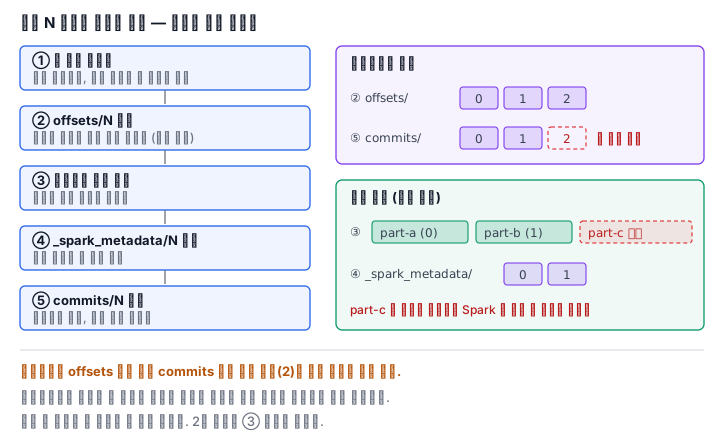
The fault tolerance section of the getting started documentation summarizes the design in one sentence. Each source has an offset that represents the position read, and the engine records the range of offsets to process at each trigger with checkpoints and a write-ahead log. The sink is designed so that the result is the same even if it receives the same batch again (idempotently). A source that can be re-read and an idempotent sink meet to give end-to-end exactly-once.
If you open the checkpoint directory, you can see this design as files. offsets/0 is the range that batch 0 decided to process, and it is written before processing. commits/0 is the mark that the batch is finished, and it is written after processing. A restarted query finds the batches that are in offsets but not in commits and reruns them over the same range. The file sink has a matching record too. _spark_metadata/0 in the output folder lists the files that batch 0 wrote out, and when you read that folder with Spark, you see only the files on this list. This is why the half-files left by a dead batch do not get mixed into the result. The file sink being marked exactly-once in the table of the API documentation is also thanks to this record.
So deleting the checkpoint is deleting the memory. If you start the same query with a new checkpoint, it reprocesses every file in the folder from the beginning. The same documentation lists changing the output path of the file sink or the deduplication columns between restarts as not-allowed changes too.
Triggers: when to run a batch
If you do not give a trigger, it runs the next batch as soon as the previous one finishes. If you give an interval, it runs at each interval. For a use like this lab, which processes only what is there and then stops, availableNow fits. According to the API documentation, it processes all the data present at the time of execution and then stops by itself; depending on source options (maxFilesPerTrigger for a file source), it processes it split into several batches, and it processes first the batches that could not be committed in a previous run. The old once trigger is scheduled for deprecation.
q = (spark.readStream.schema(schema).json("/root/landing")
       .withWatermark("event_time", "10 minutes")
       .dropDuplicates(["event_id", "event_time"])
       .writeStream.format("parquet")
       .option("path", "/root/out")
       .option("checkpointLocation", "/root/chk")
       .trigger(availableNow=True)
       .start())
q.awaitTermination()
Deduplication and the watermark
In streaming, dropDuplicates means the same as in batch but has a different cost. According to the dropDuplicates documentation, in streaming it must hold every key it has already seen as state across triggers. Without a watermark, that state grows endlessly.
A watermark is the line saying "data arriving later than this is no longer waited for". The withWatermark documentation defines that line as the maximum event time seen so far minus the threshold. This line does two jobs. It tells which windows of a windowed aggregation are finalized, and it clears the state of the finalized windows. That is why a windowed aggregation in Append mode does not come out right away when the window ends. It comes out once, only after the watermark passes the end of the window.
Be sure to remember that the guarantee goes in only one direction. The API documentation guarantees that a 10-minute watermark never drops data that is late by less than 10 minutes, but it does not say that data later than that is necessarily dropped. It is usually dropped, but it may be aggregated. The watermark is not a filter for late data but a criterion for clearing state. And to clear state in an aggregation, you must put the watermark before the aggregation, on the same time column used in the aggregation, and the output mode must be Append or Update.
What it looks like in the field
First, putting the checkpoint in a temporary folder. With one reboot the memory disappears and the query reprocesses all the files. A checkpoint is data as precious as the output.
Second, writing in place in the landing folder. If the trigger runs while an upload tool is writing a file, it reads a half file. Have it write completely under a temporary name and then move it.
Third, a resend creates duplicates. The file source judges new files by path, so a bundle resent under a changed name comes in as is. Remove duplicates by a unique ID, and apply a watermark together so that the state does not grow endlessly.
What really matters in practice
- Streaming is a succession of small batches. You write the query exactly as for a batch.
- offsets is written before processing and commits after processing. If it dies in between, the same range is run again.
- The result of a file sink is only the files listed in _spark_metadata.
- A file source judges new files by path. Content duplicates are prevented with deduplication.
- A watermark is a criterion for clearing state. Data inside the threshold is always accepted, and data outside it is usually dropped.
What you will do in the next lab
You put bundles of device events into the landing folder, run the first batch with availableNow, and confirm that record 0 appears in the checkpoint's commits and in the output folder's _spark_metadata. You see that when you put in a new bundle only that one is processed, and that when you put in two bundles at once they are processed as one batch. You count the event_id values that came in as duplicates from a bundle resent with only its name changed, and then run a dropDuplicates stream with a new checkpoint to leave only the unique count. Finally, in a second landing folder copied with modification times preserved, you run a 10-minute watermark and a 10-minute window aggregation with one file per trigger, and see in the progress records how the watermark moves and how an event that arrived about 40 minutes late is dropped.