
Apache Spark — The answer to a slow job is in the plan and the event log
Don't leave the schema to inference, and isolate broken rows instead of dropping them
In one line
A CSV has no types, so someone has to decide the schema. Inference reads the data one more time, and a single value can shake the type of a whole column. The basics are to give the schema yourself, and to sort out broken rows instead of discarding them, using PERMISSIVE mode and a corrupt-record column, leaving behind in numbers how many rows broke and why.
Why the schema becomes a problem
A format such as Parquet carries its schema inside the file. A CSV is just text separated by commas. The file does not tell you whether 2 is an integer or whether 2026-01-03 10:00:00 is a timestamp. So when Spark reads a CSV, it has to do one of two things: a person gives the schema, or Spark looks at the data and guesses.
Guessing has a cost. The CSV data source documentation says that the default of inferSchema is false and that turning it on "requires one extra pass over the data". The ratio used for inference, samplingRatio, defaults to 1.0, which means all of it. If a partner company sends a 10GB file every day, that is reading 10GB one more time every day.
A bigger problem is that the result shakes depending on the data. Inference picks a type that can hold every value of the column. If one day a line with the text two slips into the quantity column, that column is inferred as a string rather than an integer. The partner file in this lab is exactly like that. If you leave it to inference, qty and order_ts both come out as string. The sum("qty") that worked until yesterday gives a strange value today, and not one character of the code has changed.
How it works
The PySpark csv documentation recommends turning inference off or giving the schema yourself if you do not want to read the whole thing one more time, and it accepts the schema not only as a StructType but also as a DDL string.
ddl = ("order_id STRING, customer_id STRING, product_id STRING, qty INT, "
       "order_ts TIMESTAMP, status STRING, channel STRING, _corrupt_record STRING")
df = (spark.read
      .option("header", True)
      .option("mode", "PERMISSIVE")             # 기본값이지만 적어 둔다
      .schema(ddl)
      .csv("/data/partner/orders.csv"))
bad = df.where(F.col("_corrupt_record").isNotNull())
When you give a schema, Spark tries to convert the values according to that schema and runs into rows it cannot convert. What to do with such a row is decided by the mode option. The three modes the documentation defines are these.
- PERMISSIVE (default): when it meets a broken row, it puts the original string into the corrupt-record column and leaves the cells it cannot convert as null. To keep the original text, you must put a string column with that name into the user schema.
- DROPMALFORMED: ignores the entire broken row.
- FAILFAST: throws an exception when it meets a broken row.
The name of the corrupt-record column can be changed with the columnNameOfCorruptRecord option; if you do not give one, the default of the configuration spark.sql.columnNameOfCorruptRecord, _corrupt_record, is used.
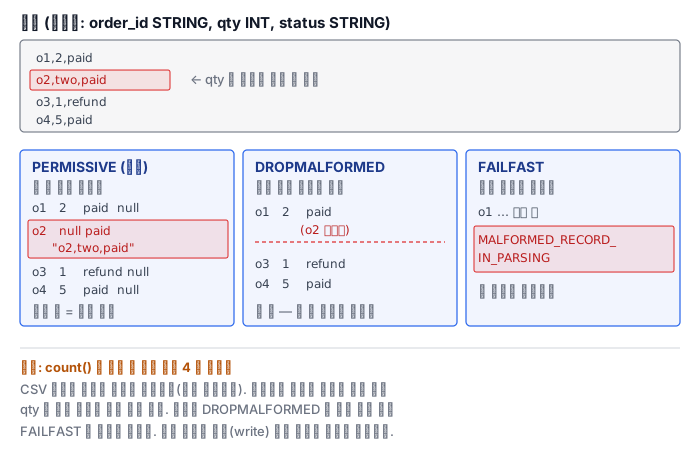
When FAILFAST fails, the outer exception is FAILED_READ_FILE, which says that reading a file failed, and MALFORMED_RECORD_IN_PARSING is attached as its cause. The description of this error advises you to set mode to PERMISSIVE if you want broken records treated as null.
Why count lies
This is where people get it wrong most often in this module. The description of mode in the same documentation carries a short warning. Under column pruning, CSV tries to parse only the columns it needs, so which rows get flagged as corrupt depends on the set of requested columns. This behavior is controlled by spark.sql.csv.parser.columnPruning.enabled and is on by default.
count() needs no column at all. So the parser does not even try to convert qty to an integer and just counts lines. If you read with DROPMALFORMED and count, you get a number that does not exclude the broken rows, and if you read with FAILFAST and count, it finishes without a hitch. In the lab's 6,000-row file too, both modes give 6,000. Only when you do a write, which has to use all the columns, do you get 5,560 rows with the broken ones removed. The conclusion "I ran it with FAILFAST and it passed, so the file is clean" does not hold unless it comes together with what was requested.
Where the documentation and the behavior differ
The documentation's description of PERMISSIVE says that a row whose number of cells is smaller or larger than the schema is not treated as a corrupt record in CSV: if it is smaller, the remaining cells are filled with null, and if it is larger, the extra tokens are dropped. But when you read with a schema that has a corrupt-record column in Spark 4.2 on this Pod, even the rows with a mismatched number of cells come out with their original text in the corrupt-record column. In the lab file, the rows sorted out that way total 440. Such details move when the version changes. The documentation is a starting point; make the call with the numbers you counted yourself.
What it looks like in the field
A mode that silently discards is the most dangerous. DROPMALFORMED looks convenient, but it leaves no record of how many rows it discarded and why. Even if the partner changes the format and half the rows break, the pipeline stays green. In the field, you read with PERMISSIVE, write the rows whose corrupt-record column is filled out to a separate quarantine table, and keep their number as a metric.
Passing the parse does not settle business rules. A quantity of -3 converts to an integer just fine. The parser looks only at the format and knows nothing about meaning. Values that are impossible for the business, such as a negative quantity or a future date, are sorted out after parsing with a separate condition and sent to the same quarantine table. A clean result is a row that has passed both gates.
By default the header row is ignored. In the documentation, the default of enforceSchema is true, and in that case the specified or inferred schema is forcibly applied and the header row of the CSV is ignored. If the partner sends the columns in a different order, the values go in by position rather than by name and silently become wrong values. The documentation also recommends turning this option off to avoid wrong results.
What really matters in practice
- Write the schema in the code. Inference reads the data one more time, and a single value changes a column's type.
- Sort out broken rows with PERMISSIVE and a corrupt-record column, and quarantine them. Do not discard them; count them and keep them.
- Do not check for broken rows with count. Because of column pruning, when no column is needed, no parsing happens at all.
- Format checks and business-rule checks are different gates. A negative quantity that passed parsing must also be filtered out.
- Turn off enforceSchema and validate the header row. This keeps a file with reordered columns from silently turning into wrong values.
What you will do in the next lab
You read a 6,000-row order CSV sent by a partner with a DDL schema. First you confirm that qty and order_ts are inferred as strings when you leave it to inference, then sort out the broken rows with PERMISSIVE and a corrupt-record column and count how many there are. You read the same file with DROPMALFORMED and see how the value from only counting differs from the value counted again after writing, and get the name of the parsing error condition from the exception of a write that fails under FAILFAST. You count the rows by the number of cells when the line is split on commas and compare how many of the broken rows have the wrong number of cells. Finally, you separately quarantine, with a reason column, the parse failures and the business-rule violations such as empty and negative quantities, and build the clean result.