
Apache Hadoop — Stand up and run HDFS and YARN in one pod
A space quota reserves a full block before you write
In one line
HDFS has two quotas. The namespace quota limits the number of files and directories under a directory, and the space quota limits the bytes counted including replicas. The space quota blocks based not on the amount already written but on the share needed to fill one new block to the end, so a 1-byte file can be stopped by a 30MB quota.
Why quotas are needed
A shared cluster has two kinds of accidents: one team's job runs wild and fills the disk, and millions of small files pour in until the NameNode cannot hold up. The former is a problem of bytes and the latter a problem of counts. In the earlier module you saw that every file and every directory is an object in NameNode memory. However ample the disk is, if there are too many names, the NameNode falls first.
So the HDFS quota guide provides the two quotas separately. They work independently, but their administration and implementation run in parallel. A quota is placed on a directory and applies to the whole tree rooted at that directory. Only an administrator can set and clear it.
How it works
First, the namespace quota. The namespace quota is a hard upper limit on the number of file names and directory names in the tree. If exceeded, creating a file or directory fails. There is a sentence worth noting in the guide. If you set the quota to 1, that directory can only be empty, and the parenthetical says a directory counts itself toward the quota. So a directory with a quota of 10 can hold only up to 9 files.
There are a few more properties. The quota follows the directory even if it is renamed, and if a rename would push it over the quota, that rename fails. Even for a directory already over, setting a quota itself succeeds. A newly created directory has no quota. The exception a client gets when exceeded is NSQuotaExceededException.
The space quota reserves in advance
The space quota is an upper limit on the number of bytes used by the files in the tree, and each replica of a block counts toward the quota. As in the guide's example, 1GB of data with a replication factor of 3 eats 3GB of quota. The directory itself uses no space, and the space used by metadata is not counted. If you change the replication factor, the quota use grows or shrinks accordingly.
The key is this sentence. If the quota does not allow room to fill one block completely, block allocation fails. The NameNode cannot know in advance how many bytes a file will actually write. After handing out a block, the client may fill that block to the end. So at the moment it hands out a new block, it checks whether "block size × replication factor" remains.
Why is it this conservative? While a block flows along the pipeline, its final size is not fixed. If it stopped midway because the quota was exceeded while writing, a half-written block and a half-made file would remain. If it checks the worst case before handing out a block, the rejection always happens before bytes flow, at a block boundary. In exchange, there is a price. Even a small file demands large headroom, and when several files are written at the same time, each open block needs that headroom separately. This is why writes suddenly get blocked when many jobs write at the same time, even if the remaining quota looks ample.
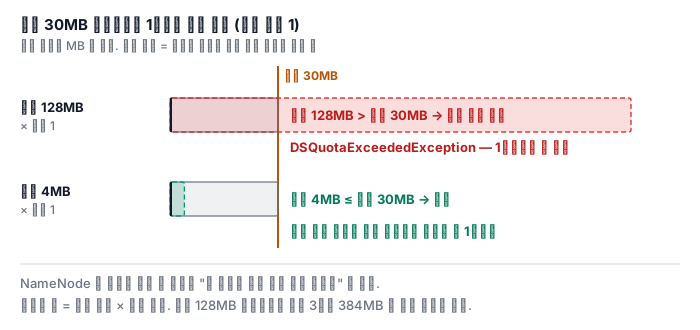
dfs.blocksize in hdfs-default.xml is 134217728 bytes (128MB) by default. Even with a replication factor of 1, a 30MB quota directory has no 128MB of headroom, so even a file whose content is just 1 byte cannot get its first block and fails with DSQuotaExceededException. If you reduce the block size of only this file to 4MB, the needed headroom becomes 4MB and it passes. The usage that remains in the quota after the file is closed is the bytes actually written times the replication factor. The advance reservation lasts only while writing.
hdfs dfsadmin -setSpaceQuota 30m /team/etl
hdfs dfs -put one-byte.txt /team/etl/                         # DSQuotaExceededException
hdfs dfs -D dfs.blocksize=4m -put one-byte.txt /team/etl/     # 통과
hadoop fs -count -q -v /team/etl
There is a floor to shrinking the block size too. dfs.namenode.fs-limits.min-block-size is 1MB by default, so you cannot make it smaller than that. The extreme case is also in the guide. A space quota of 0 allows creating a file but cannot attach any block to it. That means only empty files can be created.
How to read a quota
count -q in the file system shell outputs eight columns, in the order QUOTA, REMAINING_QUOTA, SPACE_QUOTA, REMAINING_SPACE_QUOTA, DIR_COUNT, FILE_COUNT, CONTENT_SIZE, PATHNAME. If there is no quota, the quota column comes out as none and the remaining column as inf. Here CONTENT_SIZE is the size before replication, and the remaining space quota is reduced from the value counted including replicas. If you mix the two numbers in a calculation, it is off by the replication factor. With -h it comes out in human-readable units, and with -v it comes out with a header line.
A quota is stored in the fsimage and remains after a restart, and each time it is set or cleared it is recorded in the edit log. Clearing is -clrQuota and -clrSpaceQuota. There are also quotas that you set separately for each storage type (SSD, DISK and so on), but they are meaningful only on directories that use storage policies.
What it looks like in the field
First, "there's plenty of quota left, but I can't write one file." That happens if the remaining space quota is less than block size × replication factor. With a 128MB block and replication 3, from the moment the remaining quota falls below 384MB, it cannot receive a new block. When you set a quota, include this headroom in the calculation.
Second, for a team with lots of small files, the namespace quota is more urgent. If you set only a space quota, a million 1KB files come in without trouble. What protects the NameNode is the namespace quota.
Third, the trash also eats quota. As in the design document, each user's trash is at .Trash under the home directory, so if you set a quota on the home directory, a deleted file keeps using that quota while it is in the trash. This is why the shell documentation explains -skipTrash as useful when you need to delete a file in a directory that is over its quota.
Fourth, a quota also blocks renames. Failing when you try to move a large directory into a place with a quota is normal behavior.
Fifth, you deleted it but the number is unchanged. According to the shell documentation, count, unless you give -x, counts everything including the items remaining in snapshots under that path. A file held by a snapshot is not immediately removed from the tally even if you delete it from the current tree. Snapshots are covered in the next module.
What really matters in practice
- The namespace quota is the count, and the space quota is bytes counted including replicas. The two quotas work separately.
- A directory counts itself toward the namespace quota. With a quota of N, there are N−1 children.
- The space quota demands headroom of block size × replication factor. It reserves in advance only while writing and returns to the actual size when closed.
- In
count -q, CONTENT_SIZE is before replication and the remaining space is after replication. - Where there are many small files, set a namespace quota first. What protects the NameNode is the limit on counts.
What you will do in the next lab
You set a namespace quota of 10 on a directory and upload small files one at a time, counting at which one it gets blocked, to confirm that the directory itself takes one slot. Then you set a space quota of 30MB, reproduce the error in which a 1-byte file is rejected because of the reservation for the default block size, and see the same file go in when uploaded with a block size of 1MiB. You read the columns of count -q to interpret the remaining quota of the two directories, and confirm that if you try to move a file from a directory without a quota into the directory that is already full, even the rename is rejected. In the report, you write in numbers the number of files that actually went in and the number of bytes the 1-byte file tried to reserve.