
Apache Hadoop — Stand up and run HDFS and YARN in one pod
The NameNode keeps its memory in two places: fsimage and edits
In one line
The NameNode holds the entire namespace in memory, and on disk it writes separately a picture at some point in time (the fsimage) and a journal of changes after it (the edits). Merging the two is a checkpoint, and which DataNode holds a block is not written anywhere, so every time it starts up it waits for reports in safe mode.
Why it does not end with a single file
What would happen if you rewrote the entire namespace to disk every time you created a file? On a cluster with ten million files, one mkdir would become a write of several gigabytes. Conversely, if you only append changes and never save the full picture, on restart you would have to replay months of journal from the beginning.
HDFS mixed the two approaches. The HDFS design document explains that the NameNode records every change to the metadata in a transaction journal called the EditLog, and keeps the entire namespace, including the mapping of files to blocks and file attributes, in a file called the FsImage. The same document briefly gives the reason: reading an FsImage is efficient, but applying changes to an FsImage one by one is not. So changes are only appended to the end of the journal (fast, because it is sequential writing), and the picture is taken anew now and then.
If you do not know this structure, you run into two accidents. One is the accident where a restart takes an hour. As the user guide warns, the larger the edits grow, the longer the next restart takes. The other is the accident of losing the NameNode directory. This directory is everything of HDFS: even if the block files remain intact on the DataNodes, this is the only place that knows which piece of which file each of them is.
How it works
If you open current/ in the NameNode's storage directory, it looks roughly like this.
current/
  VERSION
  seen_txid
  fsimage_0000000000000000000
  fsimage_0000000000000000000.md5
  edits_0000000000000000001-0000000000000000042
  edits_inprogress_0000000000000000043
The numbers in the file names are transaction numbers (txid). fsimage_N is the picture reflecting transactions up to number N, edits_A-B is a closed piece of journal from A to B, and edits_inprogress_C is the piece currently being written. At startup, the NameNode loads the most recent fsimage into memory and reapplies the edits after that number in order. Then the namespace as it was just before stopping is restored in memory.
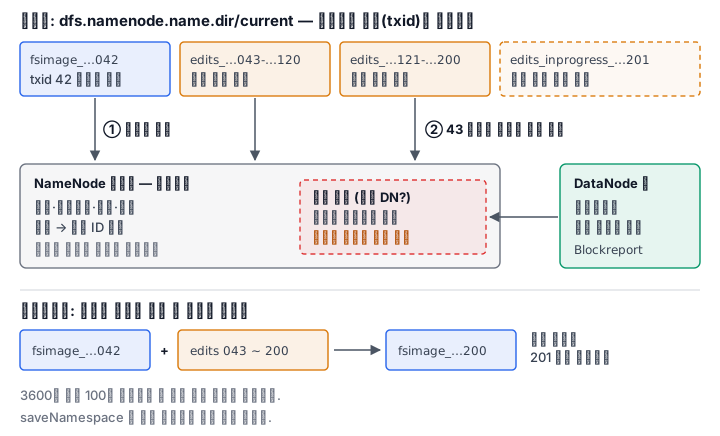
A checkpoint is doing this merge ahead of time. According to the design document, a checkpoint happens at a set time interval (dfs.namenode.checkpoint.period) or a number of accumulated transactions (dfs.namenode.checkpoint.txns), whichever is reached first. The defaults in hdfs-default.xml are 3600 seconds and 1,000,000 transactions. This merging is done not by the NameNode itself but usually by the Secondary NameNode (the Standby NameNode in an HA setup). Because of its name, it is mistaken for a spare NameNode, but the Secondary does not serve in its place when a failure occurs. It is just an assistant that takes a new picture and hands it back.
The number of pictures kept is also fixed. The default of dfs.namenode.num.checkpoints.retained is 2, and the edits needed to restore from the oldest picture up to now are kept too. It leaves a way back to the previous one even if one picture is broken.
There is something to point out here. The fsimage does not have which DataNode holds a block. It records which block IDs a file consists of, but which disk on which server holds a replica of that block is filled in anew each time by the block report (Blockreport) that DataNodes send while starting up. Locations keep changing as disks die and servers change, so writing them down would easily make them wrong information.
What safe mode waits for
So a freshly started NameNode knows all the names but does not know where the blocks are. If in this state it judged replication to be short and started replicating, it would needlessly replicate even blocks that a DataNode which has not yet reported is holding just fine. The Safemode that the design document describes is a waiting state that prevents this misjudgment. The command reference summarizes that a NameNode in safe mode does not accept namespace changes (read-only) and neither replicates nor deletes blocks.
The condition for leaving is set by configuration. The default of dfs.namenode.safemode.threshold-pct is 0.999f. When 99.9% of blocks have been reported with at least the minimum number of replicas, the condition is met, and after waiting a further dfs.namenode.safemode.extension, 30000ms (30 seconds) by default, it leaves (the lab image with only one node has set this extension to 0). An operator can also enter deliberately with hdfs dfsadmin -safemode enter.
A typical reason to enter deliberately is -saveNamespace. According to the command reference, this command writes the current namespace to the storage directories as a new fsimage and starts new edits, and it requires safe mode. This is because if the namespace changes while the picture is being taken, it becomes unclear which txid the picture shows.
How to read it without opening the disk
The fsimage and edits are binary, so you cannot read them with cat. Instead there are two offline tools. The Offline Image Viewer (oiv) converts an fsimage into a human-readable format, and the cluster does not need to be running. The default processor is Web, which starts a read-only WebHDFS; -p XML produces the largest output containing all the information, and -p Delimited produces output that lays out path, replication, block size, number of blocks, file size, quota and permissions, one per line, separated by delimiters. For counting and filtering with a script, Delimited is convenient.
The Offline Edits Viewer (oev) reads edits pieces. The default processor is xml, so each RECORD shows an OPCODE (such as OP_MKDIR, OP_ADD, OP_CLOSE, OP_DELETE) and a TXID, and -p stats only counts the number of operations per opcode. It is the tool you use to audit who deleted what and when, or to see why the namespace suddenly grew.
What it looks like in the field
First, the default storage location is under /tmp. The default of dfs.namenode.name.dir is file://${hadoop.tmp.dir}/dfs/name and hadoop.tmp.dir is /tmp/hadoop-${user.name}. A NameNode started without configuration loses the entire namespace the moment /tmp is emptied by rebooting the server. In production you must change this value, and if you give several directories separated by commas, the same content is replicated to all of them.
Second, even if checkpoints stop, there are no symptoms for a while. If the Secondary is dead, only the edits keep getting longer, and on the day of a restart weeks later, the NameNode spends hours rereading the journal. This is why the time of the last checkpoint should be put in the monitoring items.
Third, if it does not leave safe mode, block reports are short. It is the case where the DataNodes have not fully started or one disk was lost, so it falls short of 99.9%. Before forcing your way out with -safemode leave, first look at what is missing.
Fourth, a day comes when you fix the edits by hand. If the NameNode will not start because of a broken tail of the journal, you unpack it to XML with oev, and that tool also provides a way to convert it back to binary. You hope there is nothing to do, but you know the tool.
What really matters in practice
- The fsimage is the picture and the edits are the journal after it. Restoring is reapplying the journal on top of the picture.
- Block locations are not on disk. So on startup it waits in safe mode for block reports.
- A checkpoint happens at whichever comes first of time and transaction count. The defaults are 3600 seconds and one million transactions.
- saveNamespace works only in safe mode. This is because the namespace must be still while the picture is taken.
- The default name.dir is under /tmp. If you leave it in production, one reboot loses everything.
- Read the binaries with oiv and oev. You can read them without starting the cluster.
What you will do in the next lab
You first check whether the NameNode running in one Pod is currently in safe mode, enter safe mode yourself, and see directory creation rejected. In that state, you make a new fsimage with saveNamespace, read the txid in the file name, then leave safe mode and create one directory. Next you unpack that fsimage with oiv into XML and delimited formats and read the namespace. Finally, you close the edits segment currently being written with rollEdits, unpack with oev the closed segment containing the directory creation you just did, and count how many OP_MKDIR records there are.