
Apache Hadoop — Stand up and run HDFS and YARN in one pod
The NameNode holds the names, DataNodes hold the bytes
In one line
HDFS is a file system that separates the side that knows names (the NameNode) from the side that holds bytes (the DataNodes) from the very start. Whether you read through the shell or through HTTP, the order is the same: "ask the NameNode where it is, then receive the bytes from a DataNode."
Why the roles were split in two
The file system on a laptop manages names and contents together on one disk. When you find a directory entry, next to it is written where the contents are, and both are on the same machine. The problem HDFS set out to solve was of a different scale.
The HDFS design document lays down two premises at the very start: hardware failure is not an exception but the norm, and a typical file on HDFS is gigabytes to terabytes in size. To divide large files across disks scattered over hundreds of machines, someone has to know in one place "which machine holds the Nth piece of this file". At the same time, the actual bytes have to be sent out by many machines at once to get throughput.
So the roles were split. The NameNode holds the namespace (the directory tree, owners and permissions, and the replication factor of each file) together with the map of "which block is on which DataNode". The DataNodes read and write the blocks on the disks attached to their own machines. The design document states the center of gravity of this structure in one sentence: it was designed so that user data never flows through the NameNode.
If you think the opposite way, it becomes clear why this one sentence matters. If the NameNode relayed the bytes too, the throughput of the entire cluster would be tied to the network card and disk of a single NameNode. Because it handles only metadata, one machine can direct hundreds. But there is a price. Every name operation passes through that one machine, so the NameNode becomes the most important single point in the cluster.
How it works
Reading. When a client opens a file, it first asks the NameNode for that file's list of blocks and, for each block, the DataNodes that hold replicas. Then it connects directly to a DataNode to receive the bytes. The replica selection section of the design document explains that it picks the replica closest to the reader: if one is on the same rack, it uses that first.
Writing. Writing has the same shape. The client asks the NameNode for a new block, and the NameNode returns a block ID and a list of DataNodes that will receive replicas. The bytes are sent only to the first DataNode on the list. This is what the design document calls the replication pipeline. The first DataNode receives a piece, writes it to its own disk and at the same time passes it to the second, and the second passes it to the third.
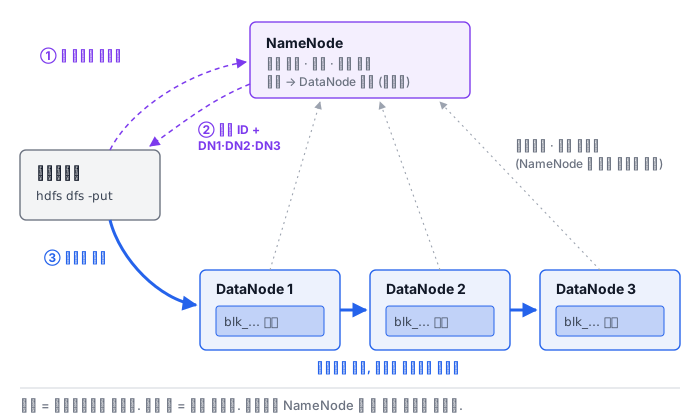
A DataNode does not know about files. To put the design document's wording directly, a DataNode knows nothing about HDFS files and stores each block as a separate file in its local file system. At startup it scans the local disks, builds a list of the blocks it holds and sends it to the NameNode: this is the block report. In normal operation it sends periodic heartbeats. The interval is 3 seconds by default in dfs.heartbeat.interval of hdfs-default.xml, and before declaring a DataNode whose heartbeats have stopped dead, the default allows a conservative time of over 10 minutes. This is to keep a replication storm from happening because of a node that wavered briefly (the lab Pod has moved this judgment up to 1 minute 30 seconds to shorten the wait).
An important property comes out of this. The design document says the NameNode never initiates an RPC; it only responds to requests from DataNodes and clients. Even when the NameNode tells a DataNode "delete this block, replicate this one", it sends it in the response to a heartbeat.
mv does not move bytes. Renaming and moving directories are namespace operations that the design document classifies as the NameNode's work. Even when a file moves to a new path, its blocks stay the same and the block IDs do not change. That is why a mv of a directory of tens of GB finishes instantly. Conversely, cp rewrites the bytes into new blocks.
Seeing the same file in two ways
There are several ways to reach HDFS. The most familiar is the hdfs dfs shell, which speaks to the NameNode's RPC port. The other is HTTP. The WebHDFS documentation defines an address shape that puts /webhdfs/v1 before the path and an op= query after it. The NameNode's HTTP address is dfs.namenode.http-address in hdfs-default.xml, with a default of 0.0.0.0:9870.
# 목록은 NameNode 혼자 답한다 — 메타데이터뿐이다
curl -s "http://localhost:9870/webhdfs/v1/user/root?op=LISTSTATUS"

# 내용은 DataNode 로 돌려보낸다 — 307 을 따라가야 바이트가 온다
curl -i "http://localhost:9870/webhdfs/v1/user/root/app.log?op=OPEN"
# HTTP/1.1 307 TEMPORARY_REDIRECT
# Location: http://<DataNode>:<포트>/webhdfs/v1/user/root/app.log?op=OPEN...
Even when you switch to HTTP, the division of roles shows through. LISTSTATUS is answered directly by the NameNode as JSON. OPEN and CREATE, as the WebHDFS documentation states, usually return a 307 redirect that goes to a DataNode. You have to follow it with curl -L for the bytes to come. The "ask, then go to receive" that the shell did internally has become two visible requests in HTTP.
One more thing. The documentation states that on a cluster with security turned off, WebHDFS accepts the user.name query value as-is as the authenticated user. This means it believes whatever it is told about who you are, and we return to this in the permissions module.
What it looks like in the field
First, the file is visible but reading it fails. The name is intact on the NameNode, but if all the DataNodes holding its blocks are down, ls works and cat fails. This is the typical symptom that arises because the two roles are separated. In that case, first look at the live DataNodes and capacity with hdfs dfsadmin -report from the HDFS commands documentation.
Second, listing works over WebHDFS but only reading fails. You often run into this when only 9870 is opened outside a firewall. The NameNode answers the listing, but reads are redirected to the DataNode address, so if that address is unreachable from the client, the second request fails. It is the same structure showing up in a different form.
Third, if the NameNode is slow, everything is slow. The bytes are carried by the DataNodes, but a single ls and even opening one small file each make a round trip to the NameNode. This is why a cluster with millions of small files struggles at the NameNode first.
Fourth, a file is written once and read many times. The design document chose a model in which, once a file is created and closed, it is not changed except by appending and truncating, and a file always has only one writer. There is no editing in the middle. It fits data that accumulates like logs, and does not fit data that is edited row by row.
What really matters in practice
- The NameNode holds the names and the block map, and the DataNodes hold the bytes. The bytes do not pass through the NameNode.
- Reading and writing are two steps: "ask, then go to receive". The 307 redirect of WebHDFS makes those two steps visible.
- Renaming is a metadata operation. The block IDs stay the same, so it finishes instantly regardless of size.
- If listing works but reading does not, look at the DataNode side first. The number of live nodes and reachable addresses are the first things to check.
- The NameNode is the single point that every name operation passes through. The number of files and the number of calls become the burden on that one machine.
What you will do in the next lab
First you ask with hdfs getconf what values the default file system address, replication factor and block size are set to, and see in the admin report that one DataNode is attached. After uploading one access log to HDFS, you count its lines from the shell, and send an HTTP request for the same directory with WebHDFS LISTSTATUS and receive it as a JSON list. Finally, you move the file to another directory and check the blocks with fsck, and see with your own eyes that the fileId and the block ID stay the same before and after the move: that name operations do not touch the bytes.