
AI Agents — A Graph, Not a Model
A Runaway Agent Has a Bad Condition, Not a Bad Loop
In one line
Incidents where an agent does not stop usually happen not because you built a loop, but because there are inputs that cannot reach the condition that ends the loop.
Why this was needed
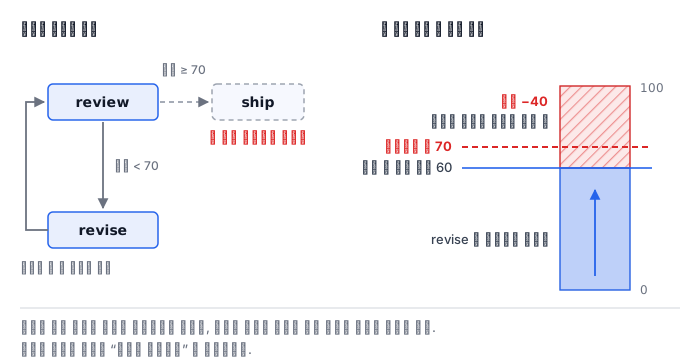
We launched an agent that rewrites an answer draft until it satisfies the rules. It ran fine for a few days. Then one day a single case would not finish and kept running, and in the log review and revise were printed alternately for hundreds of lines.
Looking at the code, the ending condition is there and fine. "If the score is 70 or higher, send it out." The problem was that the draft for that case could not reach 70. The score had been cut for two reasons, forbidden words and length, and the node that fixes things only removed the forbidden words. The 40 points cut for length stay the same no matter how many times it runs.
The loop was not at fault. The fault was the assumption that "fixing makes it better".
How it works
In LangGraph, a branch is built with add_conditional_edges. It takes three arguments.
graph.add_conditional_edges("review", after_review,
                            {"ship": "ship", "revise": "revise", "escalate": "escalate"})
The middle function returns a branch name, not the next node's name. Which branch goes to which node is decided by the third argument (the path map). Why is there this extra layer? To keep the judging code apart from the wiring. If you write node names inside the function, you have to fix the judging code every time you change the shape of the graph, and the drawing side (get_graph()) also cannot tell where it can go.
A loop is just an edge that goes backward. One line, graph.add_edge("revise", "review"), brings you back to review after passing through revise. That there is no special syntax is both the good point and the scary point of this model.
What the recursion limit counts — numbers I measured myself
Without an ending condition, does it loop forever? No. LangGraph throws a GraphRecursionError when it hits recursion_limit. The message is this.
Recursion limit of 25 reached without hitting a stop condition.
You can increase the limit by setting the `recursion_limit` config key.
The unit it counts is not the number of node executions but the superstep. Several nodes can run in one superstep. Measured directly in this lab image's langgraph 0.2.60, it looks like this.
| Graph | Minimum recursion_limit needed to run to the end |
|---|---|
| 3 nodes chained in a line | 4 |
| 3 nodes placed side by side | 2 |
| (default) | 25 |
The chained case is 노드 수 + 1 (the number of nodes plus 1) because the start channel uses up one superstep, and the side-by-side case is 2 regardless of the number of nodes because all of them run in the same superstep. If you do not know this difference, you misdiagnose "I added nodes and hit the limit" — nodes added side by side do not use up the limit.
The default of 25 is not a generous number. If a fix-it loop uses two supersteps per round (review + revise), you do not get twelve rounds.
Hitting the limit and finishing the job are different
Practice often gets this wrong. If you catch GraphRecursionError and just record it as a "failure", you cannot later tell why that case failed. Two completely different events fall into the same box.
- Finished: it reached the ending condition. Whether the result is
shiporescalate, the graph ended by its own judgment. - Hit the limit: the graph lost its chance to make a judgment. If you raise the limit it may finish, or it may never finish.
So record the exception you caught under a different name, like {"status": "limit"}. And when cases that hit the limit pile up, do not raise the limit; first look at whether the ending condition can be reached.
Set limits in two layers
Even when the ending condition is healthy, you need a limit. In practice you set it in two layers.
- Outer limit —
recursion_limit. It is the last line of defense the platform guarantees. Reaching it is an exception, so there is no result. - Inner limit — a path that counts
roundsin the state and hands over to a person atMAX_ROUNDS. Reaching this one leaves a result — the result "handed over to a person".
Without an inner limit, the outer limit catches it instead, and then the drafts made so far vanish together. The inner limit leaves a result, and the outer limit throws the result away. That difference is large in operation.
What it looks like in the field
First, getting past it by raising the limit. If you raise recursion_limit from 25 to 200, that case gets through. And next month you raise it to 400. The real problem is that there are inputs that cannot reach the ending condition, and that has nothing to do with the limit.
Second, the judgment is scattered across several places. If you look at whether to end both inside the node and in the condition function, a day comes when the two places disagree. Gather the judgment in one place, the condition function, and let nodes only do work.
Third, using the same name for the branch name and the node name. It is convenient, but you end up leaving out the path map, and then when you draw the graph you cannot see which branches exist. Even when the names are the same, it is better to write the map.
Fourth, blaming the limit for nodes that were added side by side. The table above corrects that misunderstanding. Side-by-side nodes are in the same superstep.
What really matters in practice
- For every input, ask whether the ending condition can be reached. A diagnosis that sifts out inputs that cannot reach it first is cheaper than the limit.
- Set an inner limit so that a result is left. If you rely only on the outer limit, everything done so far disappears the moment you hit it.
- Record hitting the limit and finishing under different names. If you put them in the same box, you cannot separate them later.
- What the recursion limit counts is supersteps. Only what you extend in series uses up the limit.
What you will do in the next lab
You grow /root/work/agroute/route.py one step at a time. First you build a branch equipped with a path map, and connect a loop that sends a fixed draft back to be scored again. Then you deliberately build a version without the ending condition and see a GraphRecursionError with your own eyes, and you measure directly the minimum limits of a graph with nodes chained in a line and one with nodes side by side, to confirm what a superstep is. Finally you record hitting the limit and finishing as different results, and build a diagnosis that sifts out inputs that do not get better however much you fix them.